4th February 2026
Here's whats new in v0.0.237 - v0.0.242
Features -
Ability to add external contacts to your organisation:
Organisations can now create and manage external contacts within HearLink. This allows you to store details for third parties such as GP's, legal representatives or insurers in one central place. External contacts can be added, edited or deleted from the new External Contacts section, making it easier to maintain contact records outside of patient profiles.
 Important: As this is a new feature access is controlled by group permissions. You may need to review and update your user groups to allow user's to view and use External contacts.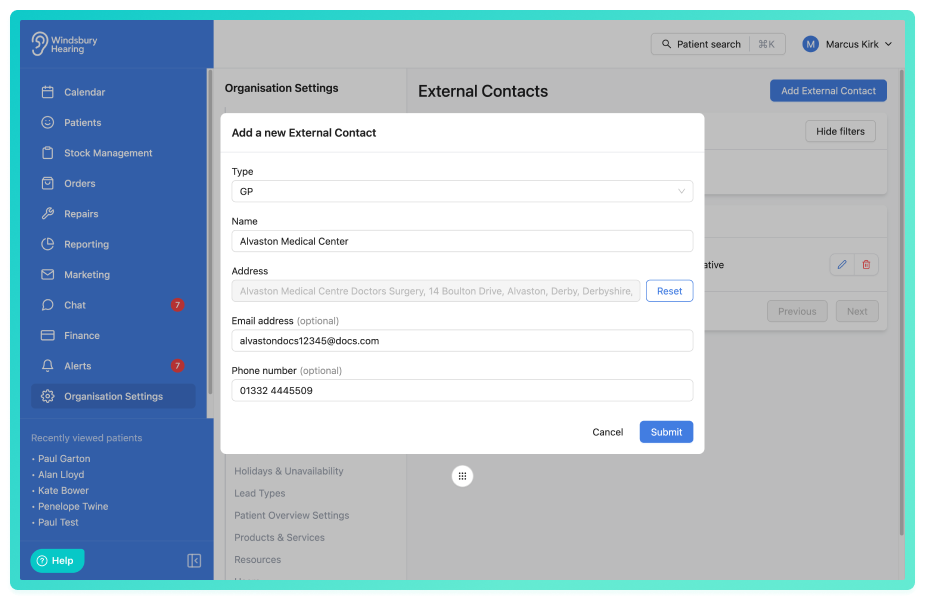
Further reading: Create, Edit, Delete and Manage External Contacts.
Ability to assign external contacts to a patient:
You can link external contacts directly to a patient record from the Patient Overview page. This makes it simple to associate relevant third parties with individual patients while keeping the contacts managed at organisation level. Contacts can also be removed from the patient without deleting them from the main external contacts list.
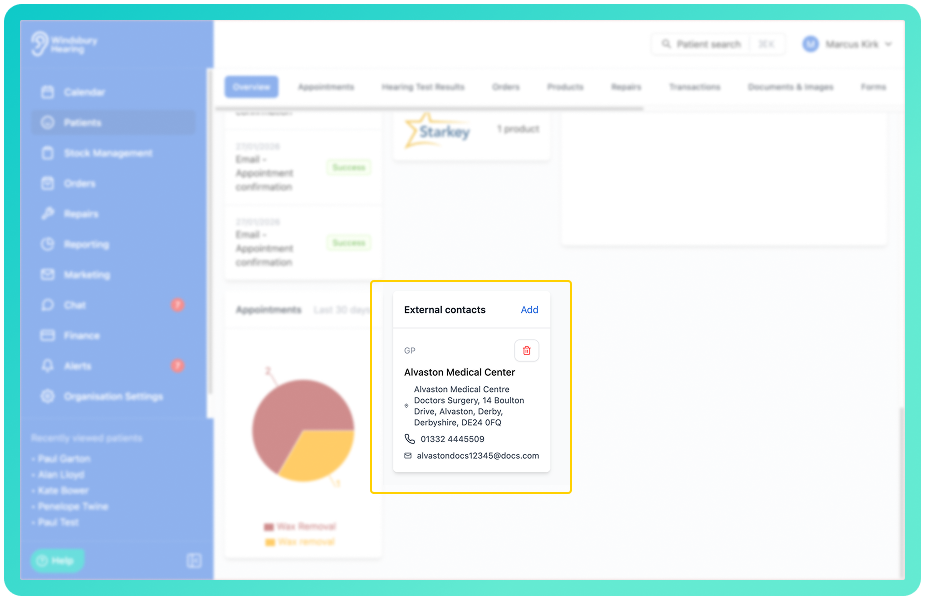
Further reading: Add an external contact to a patient.
Ability to select an external contact when generating a letter or email from a template:
Once you have an external contact connected to a patient you can select them as the recipient when generating a letter or ad hoc email. This makes it easier to create communications addressed to insurers, legal representative's, GP's or other third parties while still using patient and appointment variables.
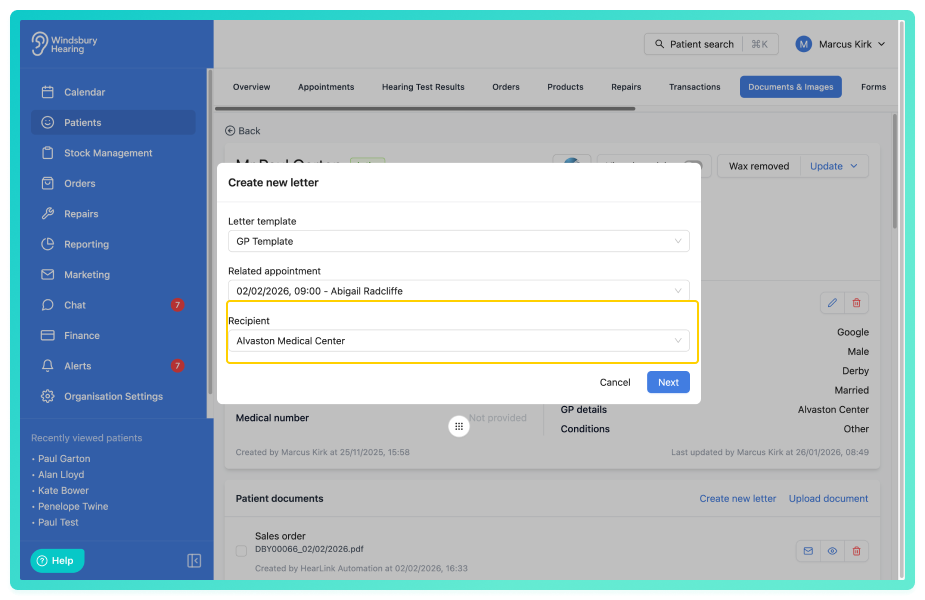
Further reading: Create letter document & Send ad hoc email.
Ability to add custom appointment statuses:
Appointment statuses have been enhanced. Organisations can now control which default statuses are available using new settings in the Calendar section, as well as create custom statuses with their own name, abbreviation and colour. This allows clinics to better align appointment tracking with their internal workflows while keeping calendar indicators clear and consistent.
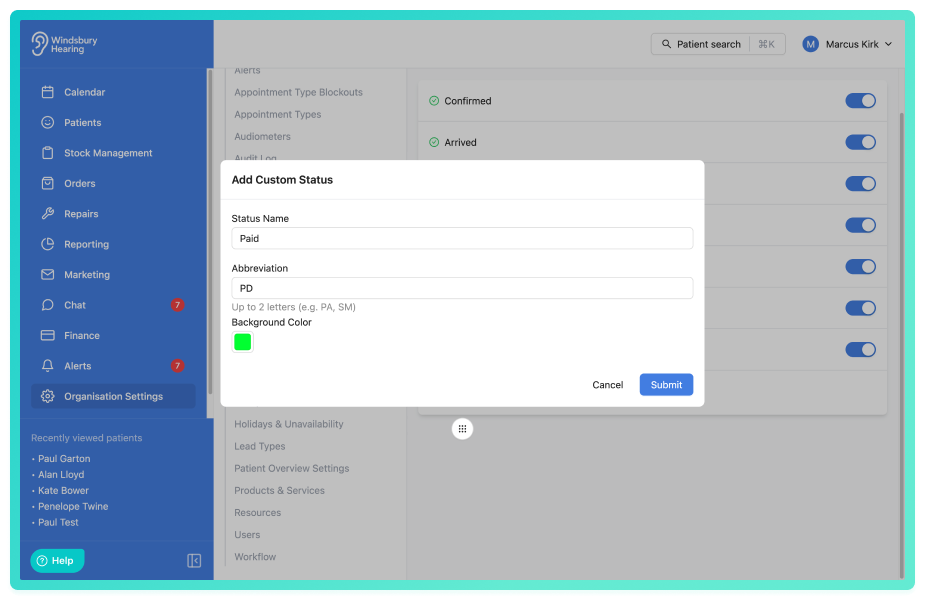
Further reading: Patient appointment statuses.
Ability to bulk reassign appointments:
We've added the ability to bulk reassign appointments for a user on any given day. This allows organisation's to quickly move a day's appointments to another or multiple clinicians when covering things such as absences, without needing to edit each appointment individually.
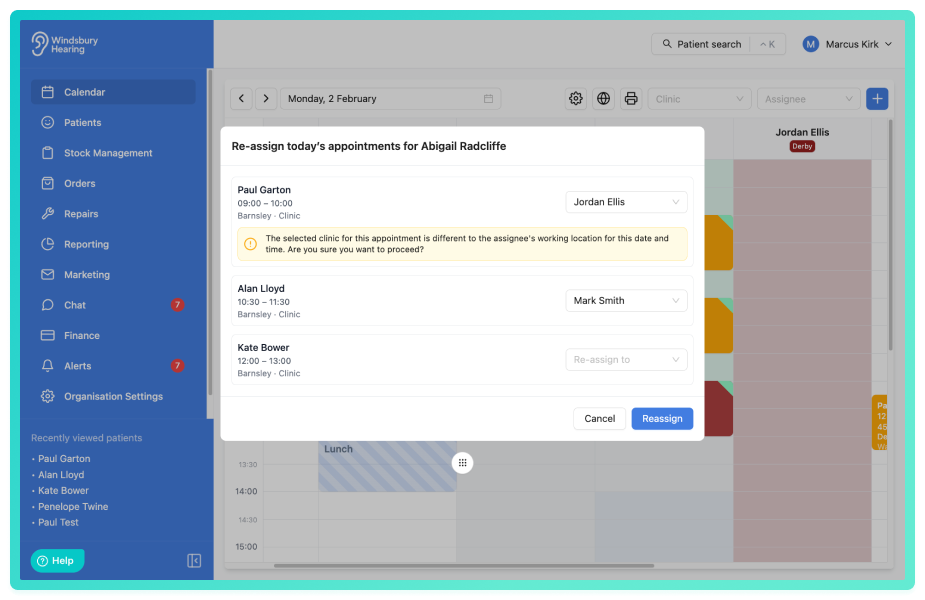
Further reading: Reassign today's appointments to another user.
Improvements -
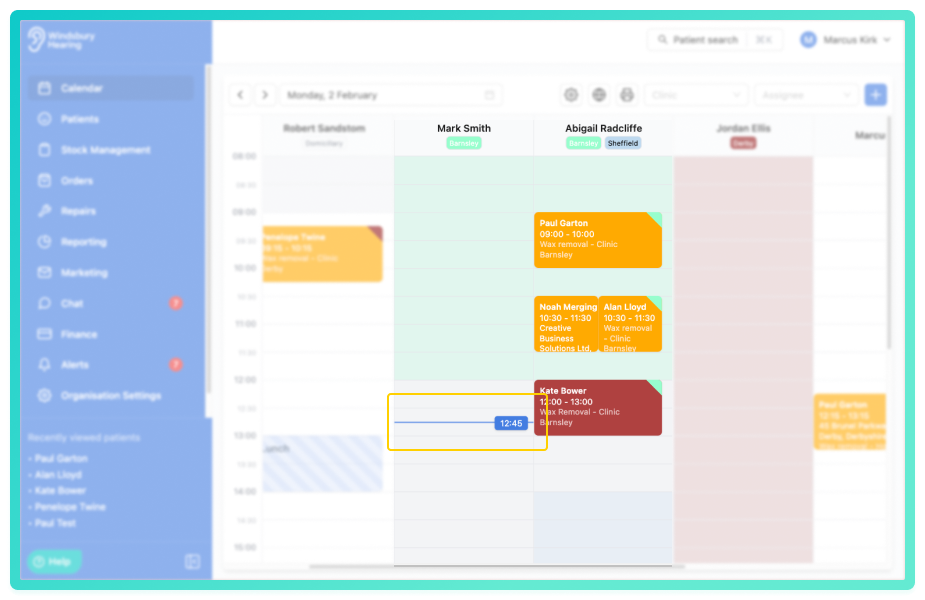
Calendar hover time indicator:
We've improved the calendar interaction by adding a hover time indicator. As you move your cursor over the calendar, you'll now see exactly what time slot you're on, making it quicker and more accurate to book and manage appointments.
Improved appointment card width:
Appointment cards now display at 90% width of the calendar column. This creates space beside existing appointments, making it easier to book additional appointments alongside others where scheduling allows.
Article on how to use variables:
HearLink uses variables across emails, SMS messages and letters to automatically insert information such as patient details, appointment information, clinic contact details and external contact data.
If your unsure how variables work or want to see a template or a full list of available options, please see our dedicated guide.
Further reading: Using Variables in HearLink.
Added more variables for letters and templates, added more font choices, bold and italics:
We've added additional variables for use in letters and communication templates, along with more font choices for bold and italic formatting in the letter template designer.
Further reading: Create, Edit, Delete and Manage Letter Templates (edit section part).
Ability to copy letter templates:
You can now quickly copy and duplicate letter templates by the click of a button. This is helpful when sending similar communications but you only need to change certain details.
Further reading: Create, Edit, Delete and Manage Letter Templates.
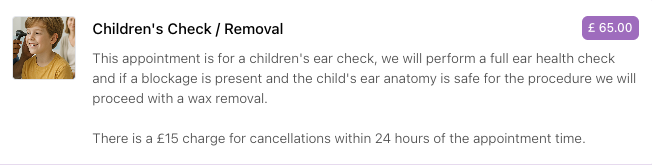
Ability to add images to clinics and appointment types, for display in the online booking widget:
You can upload images for clinics and appointment types. These images are displayed in the online booking widget, helping patients better recognise locations and services when booking appointments.
Appointment type example:
Option to add "Physical signature" on invoices:
Invoice declarations now include a physical signature option. This allows invoices to be printed and signed manually when required, supporting organisations that use paper based approval or signature processes.
'Print' schedule feature enhanced to allow date selection and CSV export:
When you print a schedule, either in day or week view, you can now select the date to which you want to print and decide whether to create a PDF or download a CSV file.
Further reading: Print Schedule.
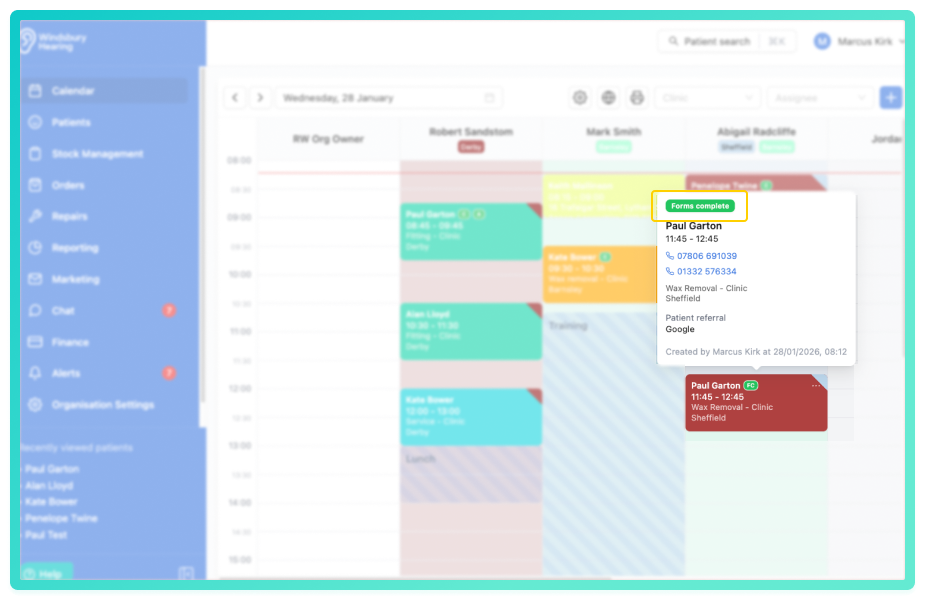
Appointment cards now display if the patient has filled in their form:
Appointment cards on the calendar now include a visual indicator showing if a patient has completed the forms sent with their appointment confirmation. These are displayed as an icon on the card and as a tag on the popover. This gives staff an instant view of form completion status without the needing to open the patient record, helping clinics prepare in advanced and follow up where required.
Ability to export appointment order and order overview reports:
You can now export both of these reports by the click of a button.
Filter the order overview report to only include hearing aids:
Added a toggle button to enable viewing this report by hearing aids only.
Ability to bulk upload a list of patients by CSV to a marketing group:
Patients can now be added to a marketing group using a bulk upload CSV. This allows organisations to quickly populate groups for external marketing activity.
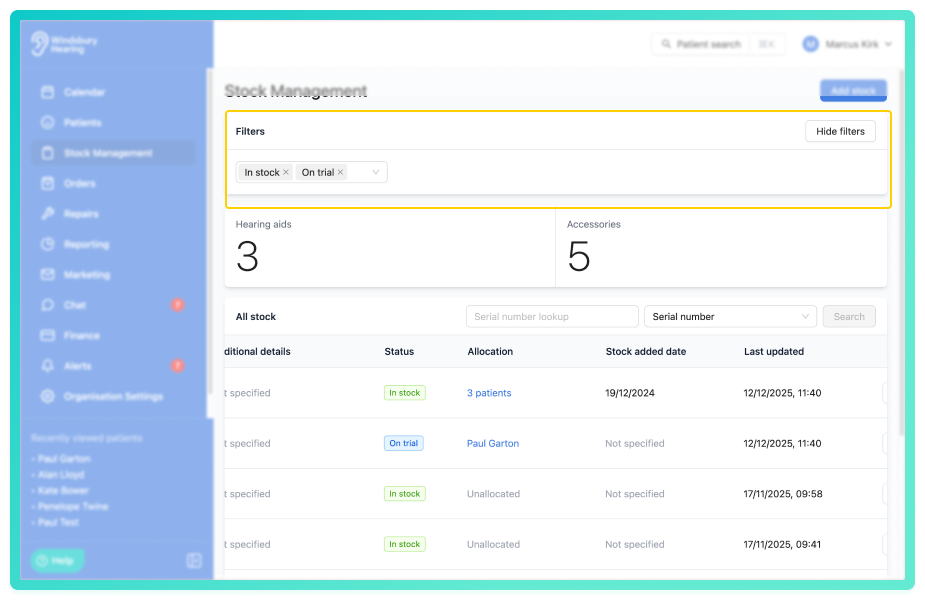
Ability to filter stock hearing aids by status:
You can now filter the hearing aid stock list by status. This makes it easier to see which devices are, for example, in stock, allocated, on trial and more.
Bug Fixes -
After a document was sent, viewing the communication would duplicate the text:
Fix: Made a change to the backend communication service.
Patient search not showing phone numbers:
Issue: When searching for a patient the phone numbers were not showing alongside the name and emails if there was no secondary phone number.
Fix: Removed check for the secondary phone number and display primary regardless.
Appointment time variable:
Issue: Variable sometimes displayed incorrect time for appointments scheduled after daylight saving clock change.
Fix: Accounted for daylight savings in the calculation.
Unit price and VAT:
Issue: Some unit prices on invoices were changing to pre VAT prices when discount applied.
Fix: Made sure the VAT calculations are handled correctly so that unit prices remain consistent regardless of adding a discount.
Was this article helpful?
That’s Great!
Thank you for your feedback
Sorry! We couldn't be helpful
Thank you for your feedback
Feedback sent
We appreciate your effort and will try to fix the article