7th July 2026
Here's whats new in v0.0.281
Features -
Record and transcribe consultations with Tonee Scribing:
Consultations can now be recorded and transcribed using Tonee Scribing, which generates structured clinical notes and patient summaries from the recording. Recording can be captured live during the consultation (with patient consent) or narrated after a patient has left.
Optional audiogram selection and additional context help Tonee generate more accurate reports. Generated reports are displayed in tabs showing the structured report, transcripts, clinical notes and patient summary. Referral recommendation flags are raised when recordings indicate findings that may warrant onward referral. Reports are AI-generated and must be review for accuracy before use.
 Important: As this is a new feature access is controlled by group permissions. You may need to review and update your user groups to allow user's to view and use Tonee Scribing.
Further reading: Using Tonee Scribing.
Tonee Scribing set up and configuration:
Tonee Scribing allows administrators to configure how AI-generated consultation reports are written across the organisation. Configuration option include audiology standard (BSA), report tone, report depth, disclaimer text and content scripts. Output toggles control whether reports are auto-saved to patient notes and whether clinical notes and patient summaries are generated. These one time settings apply to all Tonee Scribing recording across the organisation.
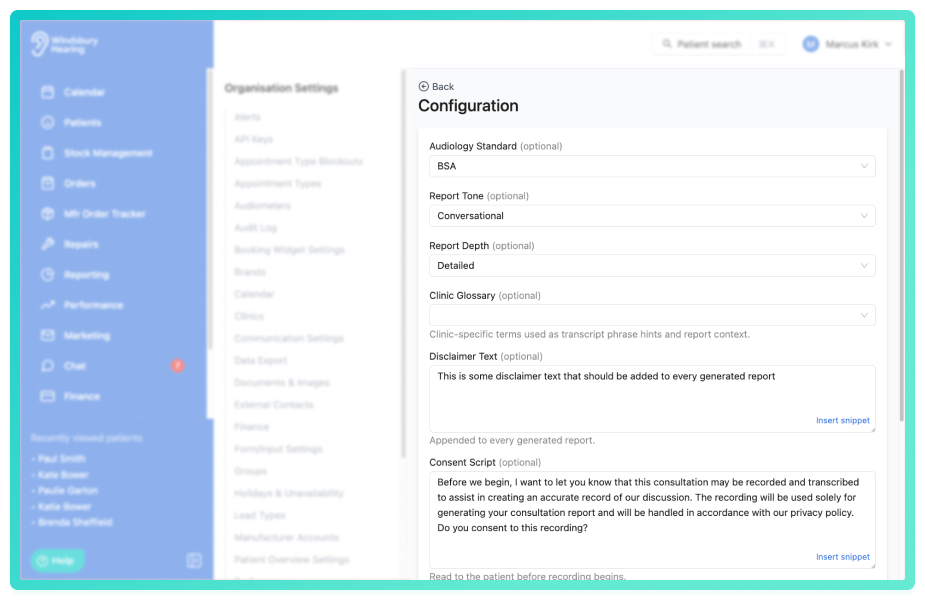
Further reading: Tonee Scribing Configuration.
Tonee Scribing consultation templates:
Consultation templates allow administrators to define the structure of AI-generated reports for different appointment types. Each template includes a system prompt (standing instructions for how to approach that type of appointment) and customisable report sections with headings and descriptions. Sections can be reordered to control report structure and templates can be activated or deactivated to control availability. Multiple templates can be created for different consultation types, allowing first assessments, follow-ups and fitting appointments to have their own distinct report structures.
Further reading: Tonee Scribing Consultation Templates.
AI summaries for hearing tests:
Hearing test cards now display an automatically generated AI summary beneath audiograms, interpreting results in plain English. Summaries cover degree and configurations of hearing loss, symmetry, type of loss and relevant observations, making audiograms understandable at a glance for both clinicians and non-clinical staff. Referral recommendation flags are displayed when findings suggest possible onward referral. AI summaries are generated drafts and must be verified against the audiogram before use, HearLink accepts no responsibility for the accuracy of AI-generated content.
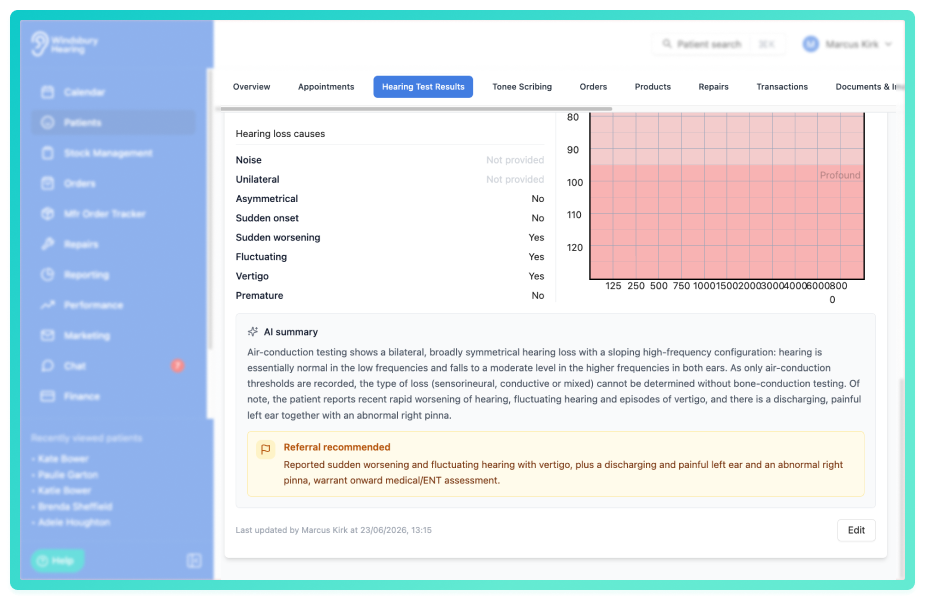
Further reading: Audiogram AI Summaries.
Improvements -
Customisable repair and manufacturer order statuses statuses:
Repair and Manufacturer order statuses can now be configured to match your organisation's workflow. Default repair statuses can be enabled or disabled and custom statuses can be created with your own names and colours. Custom statuses appear alongside default statuses throughout each workflow, allowing you to tailor status options to your specific processes.
Repair status further reading: Manage repair statuses.
Manufacturer order status further reading: Manage manufacturer order statuses.
Alert filtering by date range, type and assignee:
Alerts can now be filtered by date range, type and assignee to help you find specific alerts quickly. Multiple filters can be applied simultaneously to narrow results further. A "Show alerts assigned to me" toggle allows you to switch between viewing all alerts or only alerts assigned to you, making it easier to focus on your own workload or see the full picture across your team.
Further reading: Alerts Overview.
Emoji reactions and emoji support in chat:
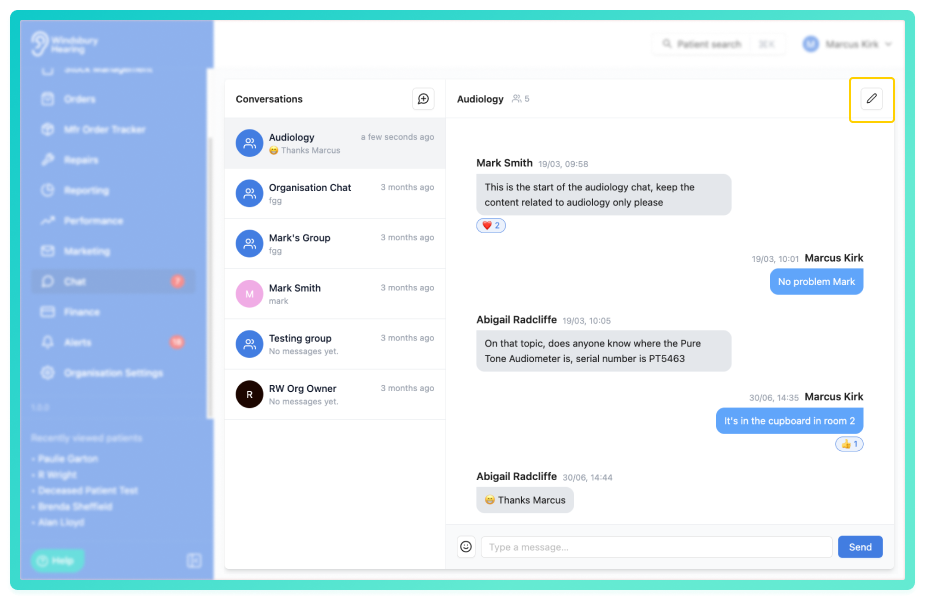
Messages in chat now support emoji reactions. Hover over a message to react with an emoji and reactions display with counts showing how many have reacted. Hover over a reaction to see who reacted. Emojis can also be inserted directly into messages you're composing using the emoji picker in the message composer.
Product type filtering for performance dashboard widgets:
Performance dashboard widgets can now be filtered by product type (Hearing Aid, Accessory, Service or Custom) for revenue and order metrics. This allows you to track performance for specific product categories separately. Product type filters work alongside existing clinic and user filters.
Further reading: Configure a performance dashboard.
Save patient records without initial contact permissions:
Patient records can now be saved without selecting any contact permissions, allowing you to create records where no contact methods are initially authorised. Contact permissions can be updated at any time by editing the patient record, providing flexibility in how and when you configure patient communication preferences.
Historical stock status for record keeping:
A new Historical stock status is now available for allocated stock, letting you retain items for record keeping while excluding them from active stock workflows. Historical stock is hidden from standard views and product selection when creating repairs. To change a product from allocated to historical click the status of the product assigned to a patient and select Historical
Bug Fixes -
Marketing campaign email display correct brand name by clinic:
Fixed an issue where marketing campaign emails displayed the organisation name instead of the correct brand name. Email sender names now reflect the brand configured for the patient's assigned clinic, ensuring brand consistency across communications.
HTML template subject line and editing fixes:
Fixed issues with HTML template editing where subject lines were not saving correctly and HTML files required re-uploading unnecessarily. Subject lines now save correctly when editing templates and the HTML field is optional during edits if only updating the subject line.
Audit log resource labels wrap correctly:
Audit log resource labels now wrap within their container instead of overflowing, maintaining a clean readable layout regardless of text length.
Optional hearing test fields properly removed when cleared:
Optional hearing test fields (duration of loss, occupation, family deafness history and notes) are now properly removed from the patient record when cleared during editing. Previously, clearing these fields would leave the existing values in place.
Appointment clinic and type selections retain current values during editing:
When editing an appointment, the clinic and appointment type drop downs now always display the currently saved values, even if those options would normally be unavailable or filtered out. Referral su types are alos automatically reset when changing the referral type, preventing outdated information from being retained.
Was this article helpful?
That’s Great!
Thank you for your feedback
Sorry! We couldn't be helpful
Thank you for your feedback
Feedback sent
We appreciate your effort and will try to fix the article