21st September 2026
Here's whats new in v0.0.287
Features -
Custom Hearing Test Report Templates:
Hearing reports in HearLink are now yours to design. This release introduces custom hearing report templates, giving you full control over both what your clinicians record on a hearing test and how that information prints on the finished report.
Building a template happens in two steps. First you choose the fields to capture - text, numbers, dates, checkboxes, signatures, image pickers and tables. Then you arrange everything on the page in the designer, placing your fields around the audiogram alongside headings, fixed wording, images and your logo.
The designer shows the report at actual size, so what you see on the screen is what it prints. You can style each block individually, set up headers, footers, margins and page numbers, and preview how the layout looks with each of your brands.
Templates work on hearing tests created in HearLink and those imported from Noah. Set one as your organisation defaults and it's selected automatically on every new test, though clinicians can still switch to another. Templates can be duplicated, edited and reports already produced are never affected by later changes
 Important: As this is a new feature access is controlled by group permissions. You may need to review and update your user groups to allow user's to view and use Hearing Report Templates.
A number of default templates have been included in this release, so the feature is ready to use immediately. You can update, change or use these templates to form your own custom template perfect for your organisations need.
Further reading: Manage Hearing Report Templates, Complete a Hearing Test and Generate the Report.
Improvements -
Transaction number on the Payments & Refunds report:
The Payments & Refunds financial report now includes a transaction number column, labelled Tx No, positioned after the Invoice No column. Each row shows the transaction number for that payment or refund, letting you trace entries back to individual transactions rather than just their invoice. Transaction numbers are also included when exporting to CSV.
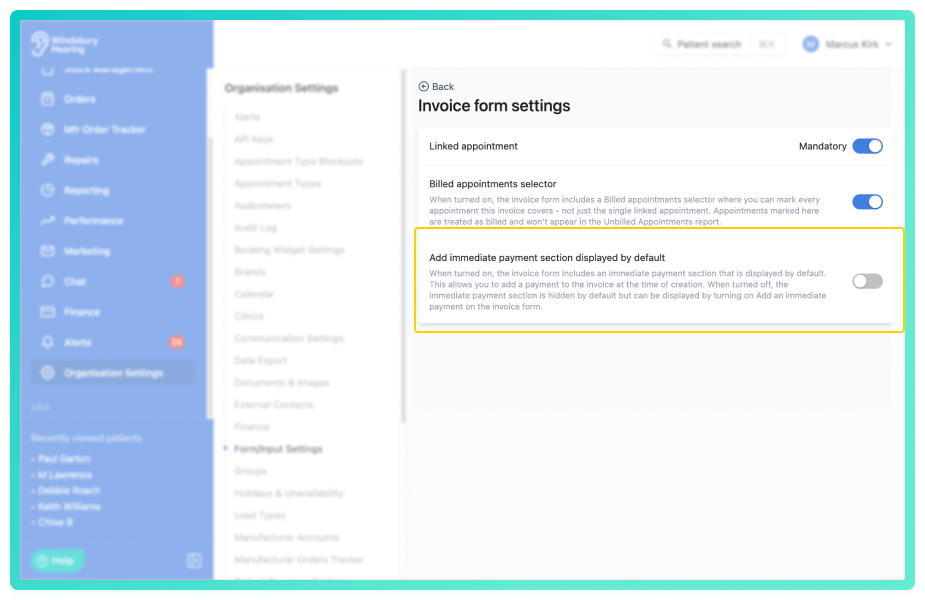
Disable Add Immediate Payment on invoices:
Add Immediate Payment can now be turned on or off at the organisation level from the Invoice from settings. Add immediate payment is enabled by default, but organisations that don't take payment at the point of invoicing can now disable it so the add immediate payment option no longer appears when creating or editing an invoice. Existing invoices are unaffected.
Further reading. Invoice form settings.
Update patient details via the public API:
The public API now supports partial updates to patient records through a new PATCH/patients/{uid} endpoint. This allows you to update specific patient details, such as address and GP information, after the initial patient record has been created. Only fields you supply in the request are updated, any fields not included remain unchanged. When an address is provided, it is automatically geocoded.
Further reading: https://docs.hearlink.co.uk/.
Was this article helpful?
That’s Great!
Thank you for your feedback
Sorry! We couldn't be helpful
Thank you for your feedback
Feedback sent
We appreciate your effort and will try to fix the article