26th May 2026
Here's whats new in v0.0.275
Features -
Manufacturer orders tracking:
Manufacturer orders tracking allows organisations to manage and track orders placed with manufacturers for hearing aids and accessories. After creating an invoice, users can raise manufacturers orders which are then tracked through a centralised Manufacturer Orders module.
Orders progress through their lifecycle with statuses including Needs Ordering, Ordered, Dispatched, Delivered and Cancelled. The table provides filtering by clinic, manufacturer, status and date range, while linked manufacturer orders are also visible on the Orders tab in the patient profile. This feture closes the gap between placing an order and generating stock, providing visbility and accountability throughout the fulfilment process.
 Important: As this is a new feature access is controlled by group permissions. You may need to review and update your user groups to allow user's to view and use Manufacturer Orders.
Further reading: Manufacturer Orders.
Improvements -
Clinic specific custom variables:
Custom variables can now be created to insert clinic specific information into email, SMS and letter templates. When creating a custom variable, different values can be set for each clinic in the organisation, with the system automatically using the appointments assigned clinic. This is particularly useful for clinic specific review links or local information. Custom variables use the format {{custom.variable_name}} and work alongside built in patient appointment and clinic variables.
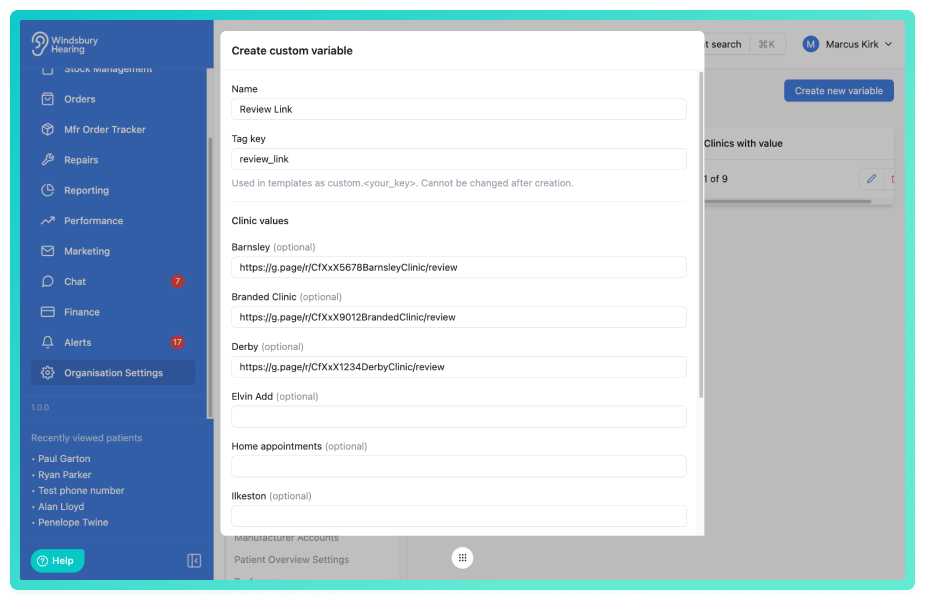
Further reading: Custom Variables.
Invoice and credit note numbers protected against duplication:
Invoice and credit note numbers are now protected against duplication. The system prevents concurrent creation from producing duplicate numbers and stops users from manually overriding a number that is already in use. When a duplicate is detected, the system displays the conflicting number and automatically suggests the next available number for review.
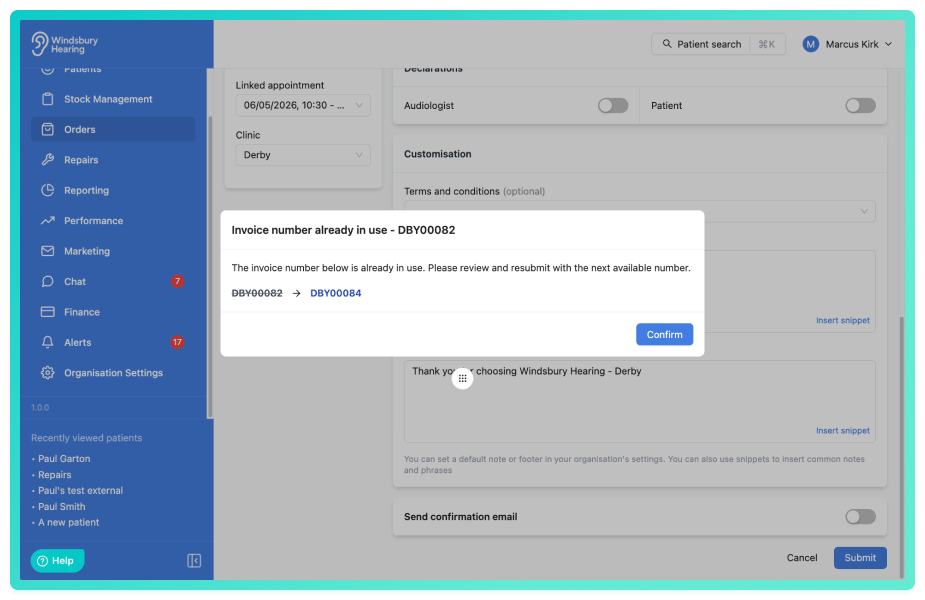
Extended audit log tracking:
The audit log system has been extended to cover additional resource types across the platform. Create, update and delete actions are now tracked for a broader set of resources including letter templates, unavailability records, appointment type blockouts, API keys, marketing campaigns and much more, providing more comprehensive visibility into system changes.
Filter email templates by communication type:
Email templates can now be filtered by communication type, allowing you to quickly narrow the template list to show only templates of a specific type such as appointment confirmations, reminders or general templates.
Audit log filtering:
The audit log can now be filtered by date range, action type (Create, Update, Delete), and resource type. This makes it easier to narrow down results to specific periods or activity types, helping you quickly find relevant actions when troubleshooting issues, reviewing user activity or maintaining compliance records.
Bug Fixes -
Grouped display for overlapping appointment type blockouts:
Fixed an issue where multiple overlapping appointment type blockouts on the daily calendar displayed as separate bars. Overlapping blockouts now display as a single grouped strip spanning the combined time range, improving calendar readability. Hovering over a grouped stripe shows a popover with details of all blockouts in the group, including time ranges, recurrence information and affected appointment types.
Repeating appointment type blockouts saved with correct date:
Fixed an issue where repeating appointment type blockouts were saving on the wrong days due to daylight saving time adjustments.
Gross unit prices display and store correctly:
Resolved an issue where gross unit prices for line items could lose precision at non standard VAT rates, causing display discrepancies. Gross prices are now calculated accurately from the total amount divided by quantity, minus any applied discount, ensuring consistency across all views and documents.
Hearing test right ear health displaying correctly:
Fixed an issue where the Right Ear Health section on hearing test results was displaying left ear data. Each ear's health information now displays in the correct column.
Order PDF's regenerate when payments are added:
Fixed an issue where order PDF's were not regenerating when payments were added to orders without a status change. Order PDF's now correctly regenerate to reflect updated payment information.
Lost and returned products excluded from repair selection:
Resolved an issue where products marked as lost or returned to supplier appeared in the repair product selection list. Only products with active stock status now appear, ensuring repairs can only be raised against stock currently with the patient.
Was this article helpful?
That’s Great!
Thank you for your feedback
Sorry! We couldn't be helpful
Thank you for your feedback
Feedback sent
We appreciate your effort and will try to fix the article