Variables allow you to automatically insert real patient, appointment, clinic and system data into communications such as:
- Email Templates (General, Confirmations & Reminders).
- SMS Templates (Confirmations & Reminders)
- Letter Templates (General & Appointment)
The amount and type of variables available at any time depend on the area of the system you are applying them to and the type, for example a Confirmation Email Template will have the form variable available but the Reminder Email Template will not.Instead of typing details manually, HearLink replaces variables with the correct information when the message or document is generated. This ensures communications are accurate, consistent and professional. Custom variables can also be created to send different placeholders depending on the clinic.
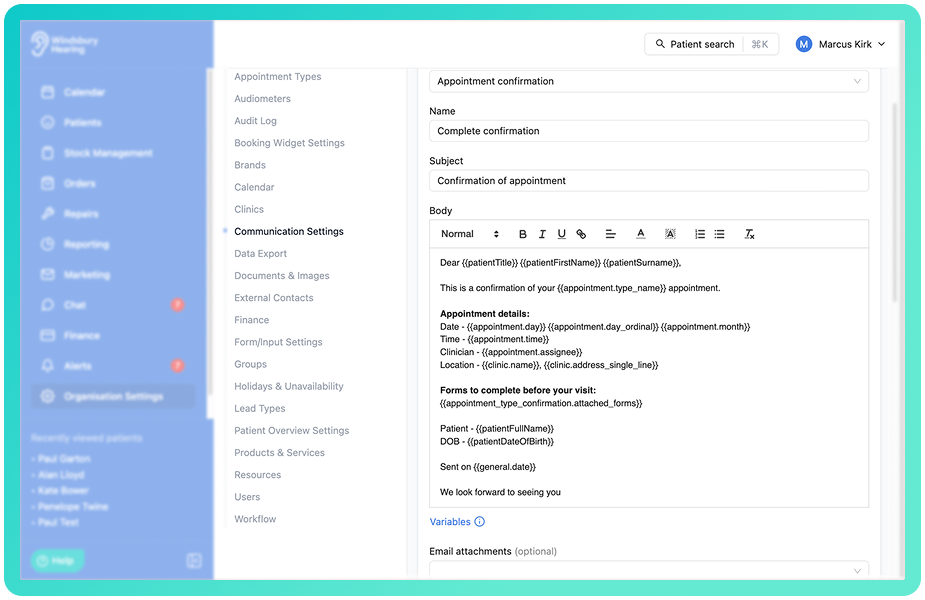
Example template using multiple variables?
Email template for a confirmation communication:
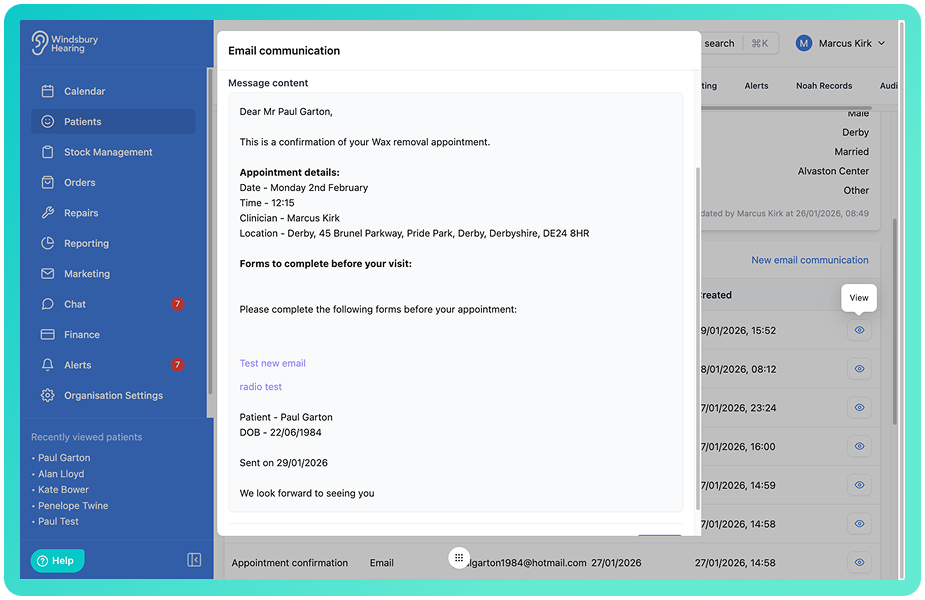
What the patient receives when the confirmation is sent:
A variable is a placeholder that looks like this:
{{patient.fullName}} (example format)
When the communication is sent, HearLink swaps the variable for real data.
Example:
Dear {{patient.fullName}} = Dear Alan Lloyd.
Where can variables be used?
Variables can be used in:
- Appointment confirmation emails and sms.
- Appointment reminder emails and sms.
- General emails.
- Letter templates
- Any communication template field that supports dynamic content.
Variable types
Below are the variables currently available in HearLink, grouped by category.
General
| Variable | What it shows |
|---|---|
| Today's date | Today's date (the date the message or document is generated |
Patient
These pull information from the patient's profile
| Variable | What it shows |
|---|---|
| Title | Patients Title (eg Mr, Mrs, Dr) |
| First Name | Patient's first name |
| Surname | Patient's surname |
| Full name | Patient's full name |
| Address | Patient's address in standard format |
| Address(Multi-line) | Patient's address split across lines |
| Email address | Patient's email |
| Primary phone number | Main contact number |
| Secondary phone number | Additional contact number |
| Date of Birth | Patient's DOB |
| Gender | Patient's gender |
Appointment
These relate to the specific appointment linked to the message or letter.
| Variable | What it shows |
|---|---|
| Type name | Appointment type (e.g. Hearing Test, Fitting) |
| Time | Appointment time |
| Name of the day | Day of the week (e.g. Monday) |
| Ordinal day | Day of month with suffix (1st, 2nd, 3rd) |
| Name of the month | Month name (e.g. March) |
| Year | Appointment year |
| Date | Appointment date |
| Date and time | Full appointment date and time |
| Duration | Length of the appointment |
| Assignee | Clinician or user assigned to the appointment |
| Assignee job title | Job title of the clinician or user assigned to the appointment |
| Days from referral to treatment | Number of days between patient creation and this appointment |
Clinic
These use details from the clinic linked to the appointment
| Variable | What it shows |
|---|---|
| Name | Clinic name |
| Address | Clinic address (standard format) |
| Address (single-line) | Clinic address in one line |
| Clinic email address | |
| Phone number | Clinic phone number |
Appointment Type Confirmation Settings Form Variable
Only available on Email and SMS confirmation templates
| Variable | What it shows |
|---|---|
| Attached forms | Displays the link or access to any forms attached tot the appointment confirmation. This variable must be included in the template if a form is attached, otherwise the form will not appear int he message. |
Recipient
These variables pull information from the selected recipient/contact linked to the communication. They are typically used in Insurance letters, Referral letters and documents sent to external organisations.
| Variable | What it shows |
|---|---|
| Name | Recipient's full name or organisation name |
| Address | Recipient's address in standard format |
| Address(Single line) | Recipient's address on one line |
| Recipient's email | |
| Phone Number | Recipient contact number |
| Policy Number | Associated insurance or policy reference |
| Authorisation Code | Authorisation or approval reference linked to the recipient |
Custom Variables
Custom variables allow you to create your own placeholders for information that isn't covered by HearLink's built in variables. These are particularly useful for clinic specific information like review links, booking URL's or custom terms and conditions.
Further reading: Custom Variables.
Was this article helpful?
That’s Great!
Thank you for your feedback
Sorry! We couldn't be helpful
Thank you for your feedback
Feedback sent
We appreciate your effort and will try to fix the article