24th April 2026
Here's whats new in v0.0.263 - v0.0.267
Features -
Automatic Xero invoice syncing:
HearLink can now automatically sync invoices directly to Xero as they are created, removing the need for manual exports and reducing duplicate data entry. Organisations can choose whether invoices are sent to Xero as Draft or Authorised, providing flexibility to match internal finance processes while keeping accounting records up to date.
Further reading: Xero.
Multiple domains:
Organisations can now add and manage multiple authenticated email domains within HearLink. This allows different sender domains to be used across clinics, brands or communication types, providing greater flexibility while maintaining improved deliverability and brand consistency across outbound emails.
Further reading: Sender Configuration, Domain Authentication.
WebHooks:
Webhook functionality has now been added, allowing organisations to subscribe to events within HearLink and receive real time updates when changes occur. For example, external systems can automatically receive notifications when patients, appointments, invoices or transactions are created, updated or deleted. This provides a powerful way to automate workflows and keep other connected systems in sync with HearLink data.
Further reading: Webhooks overview.
Improvements -
Reassign today's appointments in bulk:
The reassign today's appointments feature has been improved to allow all of a user's appointments for the day to be reassigned to another team member in a single action. This makes it much quicker to manage unexpected absences such as sickness or leave, helping clinics keep diaries accurate and ensuring patients can still be seen as planned.
Further reading: Reassign today's appointments to another user.
Calendar appointment card advanced customisation:
Appointment cards on the calendar can now be customised to suit your clinic's workflow. The new card customisation page allows control over which fields are displayed, including time, appointment type, location, outcome and status icons. Visual settings such as font size, padding and border visibility can be adjusted, and popover behaviour can be set to trigger on hover or click. A live preview shows changes in real time.
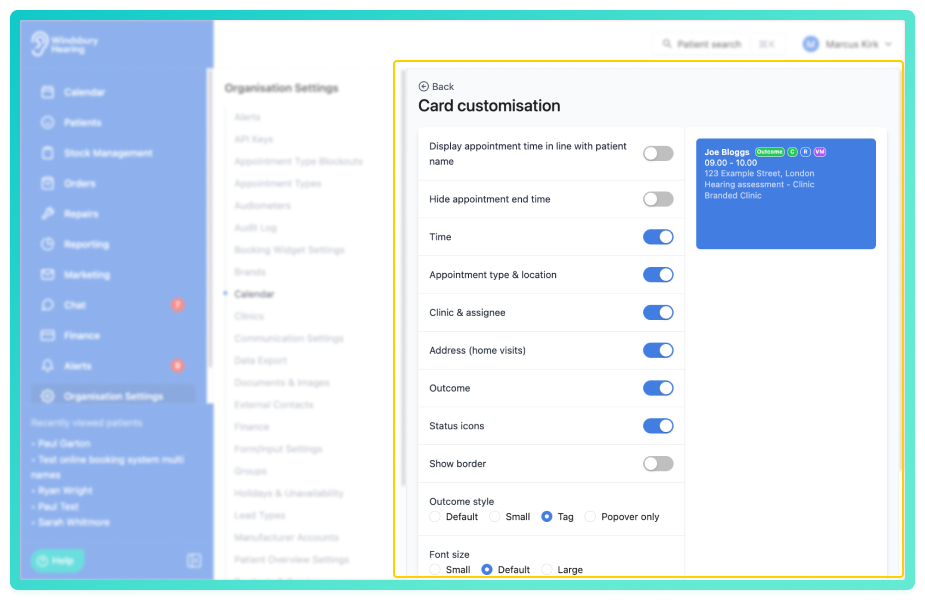
Further reading: Calendar appointment advanced customisation.
Additional API endpoints:
New API endpoints have been added to the HearLink API, expanding integration capabilities for external systems and applications. For full details on available end, authentications and usage examples, refer to the technical documentation at https://docs.hearlink.co.uk/
Further reading: Create Manage and Delete API Keys, Using an API Key to authenticate API requests.
First and last name now included in marketing CSV exports:
Marketing CSV exports now include separate first and last name columns. This provides cleaner exported data for use in third party systems, spreadsheets or external marketing tools where split name fields may be required.
Extend communication automations from 12 to 24 months:
The scheduling range for communication automations has been increased from 12 to 24 months. This allows organisations to plan longer term patient communication journeys, recalls and follow up messaging further in advance without requiring additional manual setup later.
Edit custom alert names:
Custom alert names can now be edited to keep alert labels accurate and relevant. When a custom alert type name is updated, all future alerts using that type will automatically display the new name, helping maintain consistency across patient records and scheduling.
Ability to apply a category to a note snippet:
Note snippets can now be assigned to categories for improved organisation and quicker selection. When a category is applied, snippets will be grouped into subfolders within the snippet selector, making it easier for users to locate the most relevant templates when adding notes.
Further reading: Add a note snippet, How note snippets work.
Phone number validation for online booking:
Phone numbers entered in on the online booking widget are now validated before submission to ensure they follow standard formatting requirements and contain the correct number of digits. The system accepts standard formats with a leading zero, international formats with or without spaces. Helping to reduce errors and improve data quality.
Patient address & phone number field added to appointment export:
Appointment exports now include the patient's address & phone number, providing more complete contact information when exporting appointment data for reporting or external use.
Filter invoice and revenue margin reports by assignee:
Invoice revenue and margin reports can now be filtered by assignee, allowing financial data to be viewed for specific team members. This provides better visibility into individual performance and makes it easier to analyse revenue contributions across the organisation.
Bug Fixes -
First and last name variables not working correctly for patients with trailing spaces:
Fixed an issue where first and last name variables could fail to populate correctly if a patient record contained trailing spaces in the name fields. Variables will now correctly trim unnecessary spacing and display the expected patient name in communications and templates.
Date sent column for scheduled communications was incorrect:
Resolves and issue where the date sent column for scheduled communication was displaying incorrect information. The column will now accurately show when the communication was sent, providing clearer reporting and better visibility when reviewing scheduled messages.
Prevent potential issues with infinite loops when creating credit notes:
Improvements have been made to the credit note creation process to prevent potential infinite loop scenarios in certain edge cases. This update improves reliability and ensures credit notes can be created more safely and consistently.
Current time indicator on the calendar now updates correctly:
Resolved an issue where the current time indicator was not updating correctly throughout the day. The indicator will now refresh as expected, providing a more accurate live view of the current time within the calendar.
Calendar header overflow fixed for long clinic names:
Resolved an issue where long clinic names could cause the calendar header to overflow and cause UI issue's further down the calendar. Clinic names now wrap or truncate appropriately to maintain a clean calendar layout.
Was this article helpful?
That’s Great!
Thank you for your feedback
Sorry! We couldn't be helpful
Thank you for your feedback
Feedback sent
We appreciate your effort and will try to fix the article