7th April 2026
Here's whats new in v0.0.260 - v0.0.262
Features -
Ability to send direct and group messages across you organisation:
The chat feature has been improved to allow users to send direct messages to individual members of the team or create group conversations. This enables quicker internal communication and collaboration within HearLink, helping teams coordinate more efficiently without needing to rely on external messaging tools.
Further reading: HearLink Chat.
API keys manageable within the organisation settings:
API keys can now be created and managed directly within the organisation settings. This allows organisations to generate and control their own API keys. With additional API's and web-hooks planned, this update provides a foundation for easier integrations and greater flexibility.
Further reading: Create, Manage and Delete API Keys, Using an API Key to authenticate API requests.
Improvements -
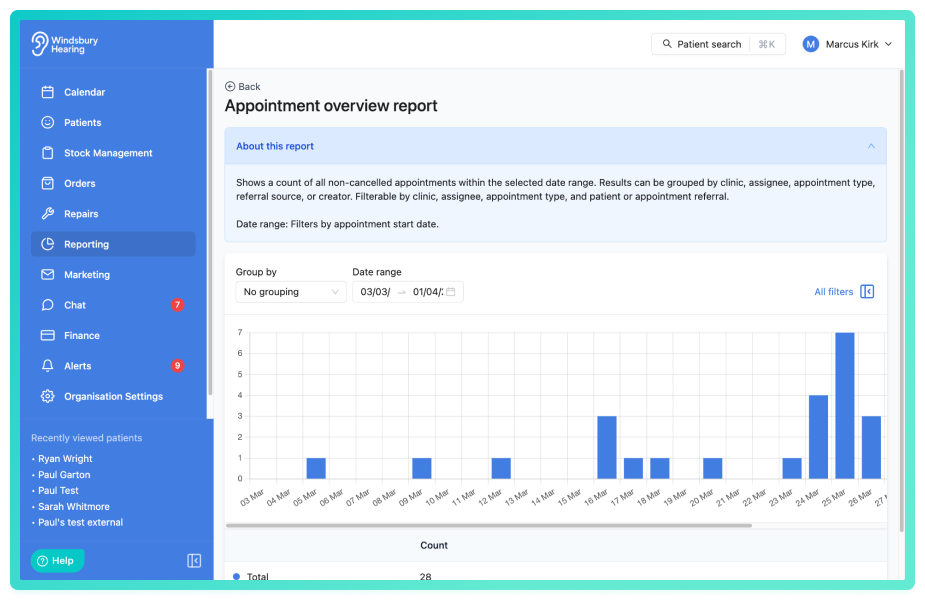
Added descriptions to all reports:
Descriptions have been added to all reports to help users better understand what each report contains, making it easier to identify the most relevant report when reviewing or exporting data.
Option to select template when sending a document:
When sending documents, users can now choose from an existing template to populate the communication content. This allows for more consistent messaging and saves time by enabling predefined templates to be selected rather than creating new content each time.
Added remaining balance and quick select button when adding a transaction:
When adding a transaction to an invoice or order, the system will now display the remaining balance along with quick select buttons for common payment amounts. This makes it faster and easier to record payments accurately.
New users created will have a blank schedule by default:
Newly created users will now start with a blank schedule by default. This prevents schedules from being unintentionally populated with existing schedule patterns and allows administrators to configure each user's availability more accurately from the outset.
Documents sent via email correctly show the document type in the communication:
When documents are sent via email, the communication will now correctly display the specific document type that was sent. Previously, these communications could appear as "Ad hoc", which made it harder to identify the document type within the communication history. This improvement provides clearer records and better visibility for users reviewing communications.
Renamed GP Name to GP surgery in the online booking widget:
The previously labelled "GP Name" within the online booking widget has been renamed to "GP Surgery". This change provides a clearer wording for patients when entering their GP details and better reflects the information typically required during booking.
Bug Fixes -
Automation communication now sends correctly when statuses are applied for the first time:
Resolves an issue where communication automations were not triggering when a status was applied to an appointment for the first time. Automations will now correctly detect the initial status and send the configured communications as expected.
Improvements to the Noah audiogram handler:
Updates have been made to the Noah audiogram handler to improve the audiogram graphs are process and displayed, especially when it comes to masked icons. These changes ensure the audiogram data pulled from Noah is handled more reliably and that the resulting graphs display accurately within the system.
DST fix for the printed schedule CSV export:
Fixed an issue affecting printed schedule CSV exports where Daylight Saving Time (DST) adjustments could cause appointment times to appear incorrectly. The export now correctly accounts for DST, ensuring times match the actual schedule.
Hearing test clinic selection now correctly matches the appointment:
Resolved an issue where the clinic field on hearing tests would default to the first clinic in the list. the system will now select the correct clinic when pulling data from Noah.
Brand correctly applied to communications:
Fixed an issue where, in certain situations, the correct brand was not being applied to communications. Communications will now consistently use the appropriate brand settings when being sent.
Was this article helpful?
That’s Great!
Thank you for your feedback
Sorry! We couldn't be helpful
Thank you for your feedback
Feedback sent
We appreciate your effort and will try to fix the article