5th March 2026
Here's whats new in v0.0.251 - v0.0.254
Improvements -
Added outcome and cancellation filters to the appointment group within manual marketing:
We've added new filtering options to the appointment group within the Manual Marketing Query builder. You can now filter based on appointment outcomes and cancellations, allowing for more targeted marketing campaigns and follow ups based on how appointments have concluded.
Further reading: Manuel marketing queries.
Remove the organisation owner permission on Calendar and Booking widget and add them to groups like all other permissions:
Permissions for Calendar and Booking Widget settings have been updated to align with the rest of the system. These settings are no longer restricted to the Organisation owner role and can now be assigned through permission groups like other system permissions. This provides greater flexibility when managing user access and responsibilities.
 Important: You may need to review and update your user groups to allow specific groups access to the new settings.
Added an 'On loan' option within stock management:
Stock items can now be marked as On loan within stock management. This helps track items that have been temporarily issued without being permanently allocated, providing better visibility and control over stock that is currently out but expected to be returned.
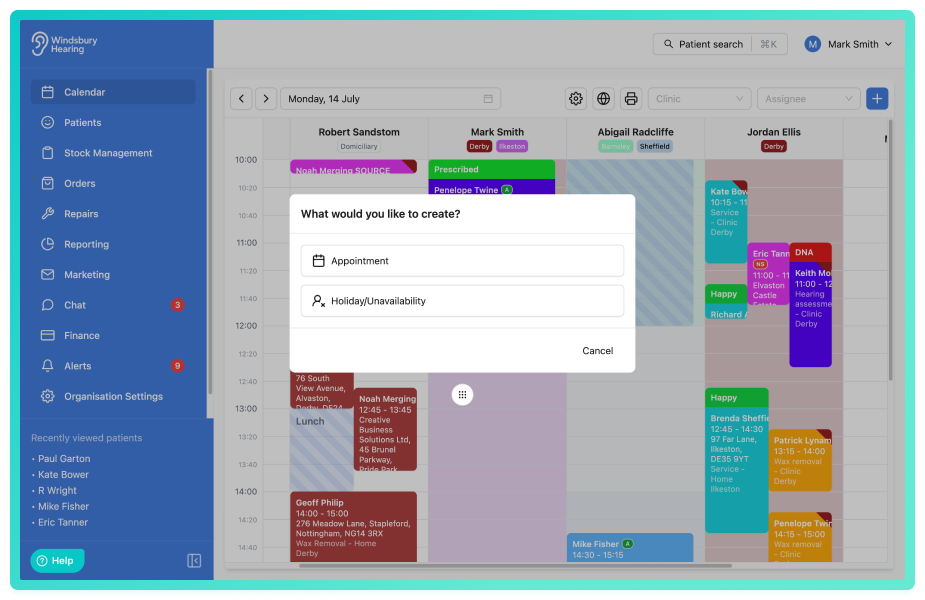
Allow holiday and unavailability to be booked by clicking on the calendar:
It is now possible to create holiday or unavailability blocks directly by clicking on the calendar. This makes it quicker to block out time without the need to navigate through additional settings, helping users manage more availability more efficiently.
When clicking on the calendar to book an appointment with an assignee, filter the appointment types to only those that the assignee is able to complete:
When booking an appointment from the calendar for a specific assignee, the list of available appointment types will now be automatically filtered to show only those that the selected assignee is able to perform. This helps prevent incorrect bookings and improved scheduling accuracy.
Added a toggle to allow customers to send a copy of their completed form directly after submission:
A new option has been added to when creating a custom form that allows patients to receive a copy of their completed form immediately after submission. When enabled, the patient will automatically receive a copy for their own records.
Further reading: Custom forms.
Ability to duplicate an email template:
You can now duplicate existing email templates. This allows you to quickly create new templates based on existing layouts without needing to recreate the content from scratch.
Further reading: Create, Edit, Delete and Manage Email Templates.
Ability to duplicate an SMS template:
SMS templates can now be duplicated, making it easier to reuse existing templates and create variations quickly while keeping formatting and variables intact.
Further reading: Create, Edit, Delete and Manage SMS Templates.
Add minutes option when scheduling a communication automation:
Communications automations now support scheduling with minutes as a time unit. This allows for more precise timing when configuring automated emails triggered by appointment outcomes or status changes.
Further reading: Communication Automations.
Use native time picker on unavailability edit:
The unavailability edit screen now uses the device's native time picker. This provides an more consistent and user friendly way to adjust times when editing unavailability blocks.
Bug Fixes -
Couldn't scroll schedule override when lots of blocks in main schedule:
Fixed an issue where users were unable to scroll properly within the schedule override view when a large number of blocks were present in the main schedule.
Booking widget updates to address issues with resources:
Resolved issues within the booking widget related to resource handling. These improvements ensure resources are correctly recognised and applied when patients book appointments online.
Unit price when adding separate invoice line items not displaying correctly:
Fixed an issue where unit prices for when adding multiple line items would display incorrectly on the invoice.
Orders showing partially paid in certain circumstances:
Resolved a Javascript rounding issue on orders where the system thought there was still a fraction of a penny to pay from the order, making the status not display correctly.
Was this article helpful?
That’s Great!
Thank you for your feedback
Sorry! We couldn't be helpful
Thank you for your feedback
Feedback sent
We appreciate your effort and will try to fix the article