You can control how many weeks in advance patients are able to book appointments online using the Maximum Advance Booking setting. This allows you to limit availability in the booking widget to a defined number of weeks per clinic.
In this article we'll cover how to:
- set maximum advanced booking.
- understand how it affects online availability.
Only users with the correct permissions can edit the maximum advanced booking. If you think you should have permission to perform such an action please contact the organisation owner.Set maximum advanced booking
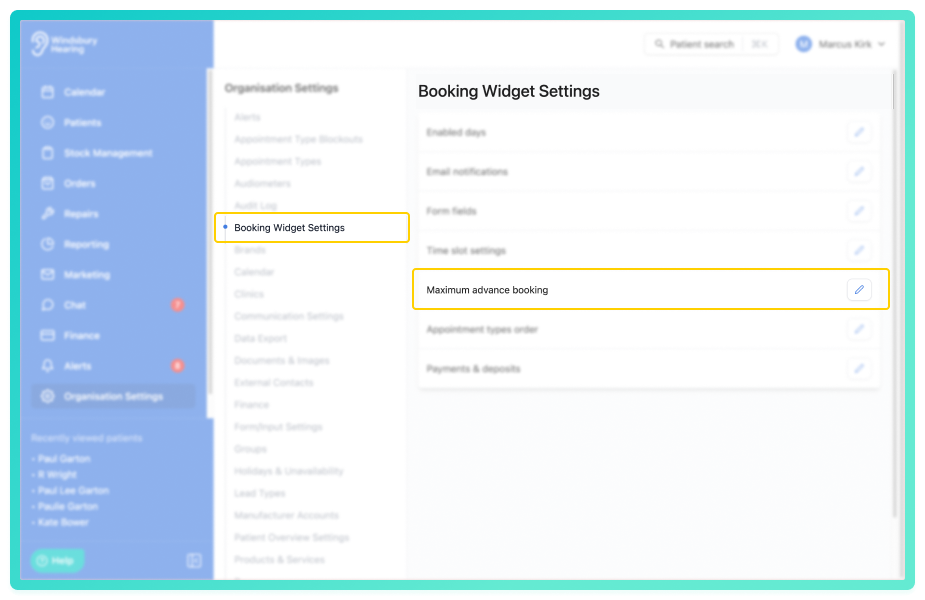
- Navigate to Organisation settings.
- Locate and click the Booking Widget Settings section of the settings.
- Click the Edit icon
 next to Maximum advance booking.
- Enter the number of weeks ahead you would like each clinic to be available for online booking. You can set this up to a maximum of 12 weeks.
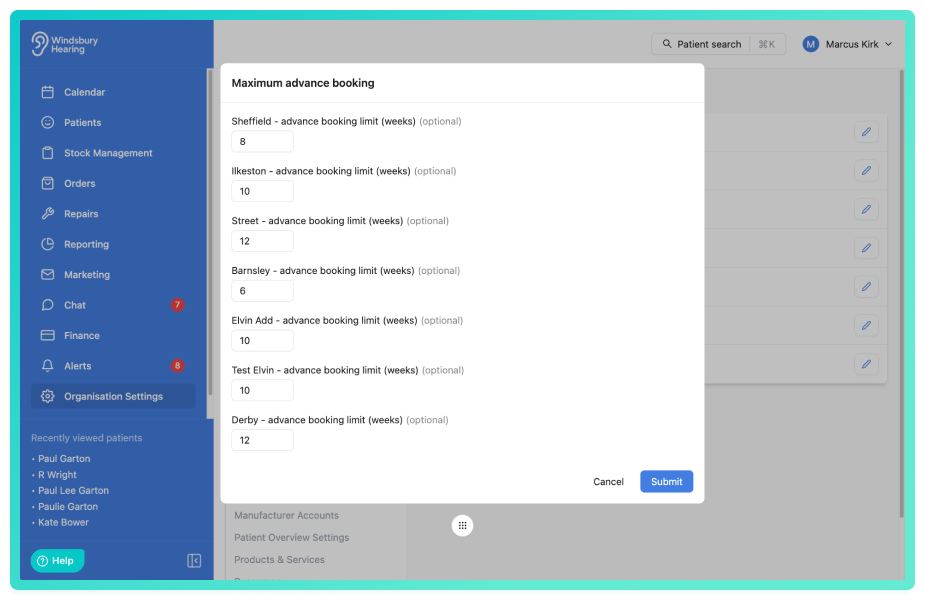
- Click Submit to apply the changes.
How maximum advanced booking works
Once set, patients using the online booking system will only be able to select appointment within the defined number of weeks.
Appointments beyond the timeframe will not appear as available in the widget. This setting applies per clinic and can be configured individually for each location.
Was this article helpful?
That’s Great!
Thank you for your feedback
Sorry! We couldn't be helpful
Thank you for your feedback
Feedback sent
We appreciate your effort and will try to fix the article