If a clinician or assignable staff member is unavailable, for example due to illness or leave, you can quickly reassign their appointments for the day to another user without cancelling or rescheduling them.
This keeps the diary accurate while ensuring patients are still seen as planned.
In this article we'll cover how to:
- reassign a user's appointments for a specific day.
Reassign today's appointments
- Navigate to Calendar.
- Locate and click the User whose appointments you want to reassign.
- Click the Re-assign today's appointments text.
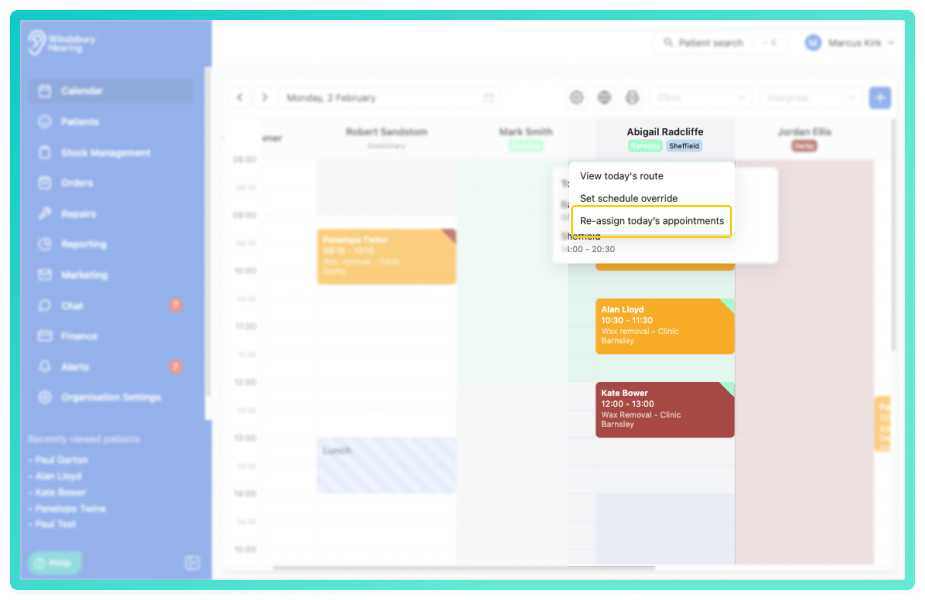
You can now reassign appointments in two ways:
- Individually - choose a different user for specific appoitnments.
- Bulk reassign - move all appointments for the selected day to one other user in a single action.
- Select which user from the dropdown is to take the appointment.
- Choose the appointments to move, or assign all.
- Click Reassign to move the required appointments.
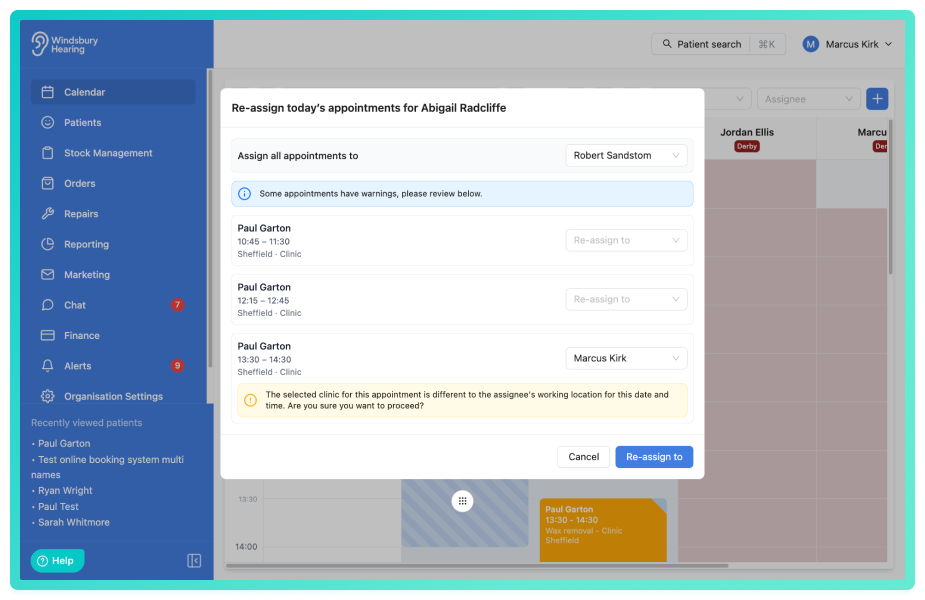
All selected appointments will now be reassigned while keeping their original times and booking detials.
You will receive warnings when reassigning appointments for schedule and clinic mismatches. Pleased pay attention to these warning when reassigning appointments.Was this article helpful?
That’s Great!
Thank you for your feedback
Sorry! We couldn't be helpful
Thank you for your feedback
Feedback sent
We appreciate your effort and will try to fix the article