10th November 2025
Here's whats new in v0.0.206 - v0.0.208
Features -
Ability to take payments through the online booking widget:
HearLink now allows your organisation to take payments or deposits when patients book an appointment online.
To accept payments and deposits you will need to connect an existing Stripe account or create a new one. This can be done directly from HearLink.Further reading: Payments & Deposits.
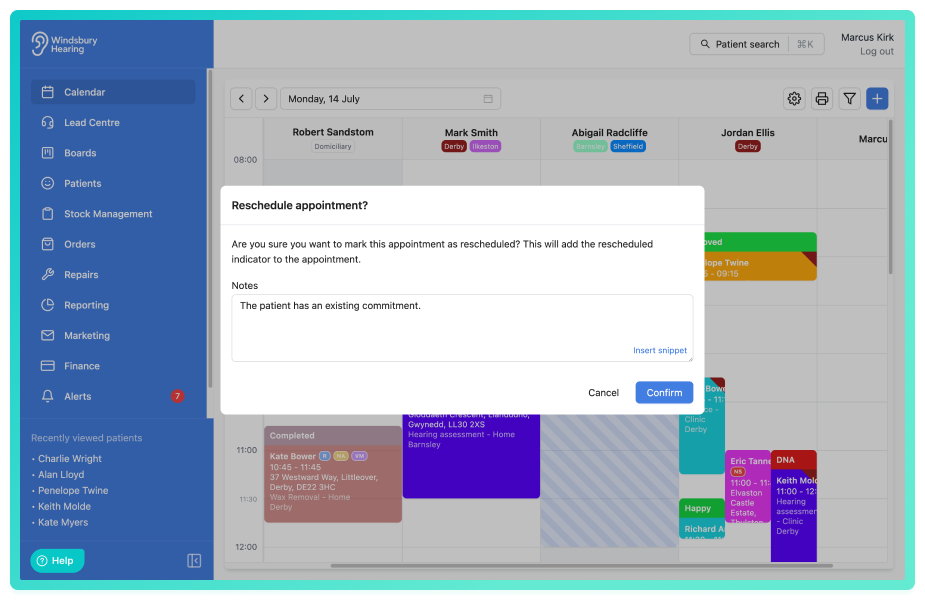
When marking an appointment as rescheduled, add an optional note:
The rescheduled status on the patient appointment card now has the ability to add a note when selecting this status. If provided the note will be added to the notes section in the patient overview. This is set to optional as default.
Further reading: Patient appointment statuses.
New option in calendar settings to make the rescheduled note required:
In regards to the new feature above, when adding a rescheduled note this can be enabled to be required in the calendar settings. If this setting is enabled a user must enter a note when marking an appointment as rescheduled.
Further reading: Calendar settings (organisation).
Improvements -
Add 20 minutes to calendar time slot:
The calendar time slot option in calendar settings can now be set to either 15, 20, 30 or 60 minutes.
Ability to specify whether your catalogue pricing includes or excludes VAT:
When this setting is enabled, all prices entered into HearLink with be considered to include VAT and the amount with be automatically calculated and separated out on invoices. When the setting is disabled, all prices entered will be considered to be exclusive of VAT and the amount will be added on top of the prices entered.
Further reading: VAT & currency settings.
Add Lord as a patient title:
Lord now available to select in the title dropdown when creating a patient.
When creating unavailability, the increments are now every 5 minutes:
Unavailability is now available to book in 5 minute slots increased from 15.
Bug Fixes -
Ignore keystroke monitoring when user is typing into a text field:
Issue: On occasion when a user is typing into a text field and presses the K key, it would launch the patient search feature (CTRL + K, CMD + K).
Fix: Added logic to ignore the keystroke monitoring when typing into a text field.
Was this article helpful?
That’s Great!
Thank you for your feedback
Sorry! We couldn't be helpful
Thank you for your feedback
Feedback sent
We appreciate your effort and will try to fix the article