The Finance section of Organisation Settings allows you to configure the key financial components used across your HearLink account. From VAT settings to invoice details and payment methods, this section ensures your financial documentation aligns with your organisational and regulatory requirements.
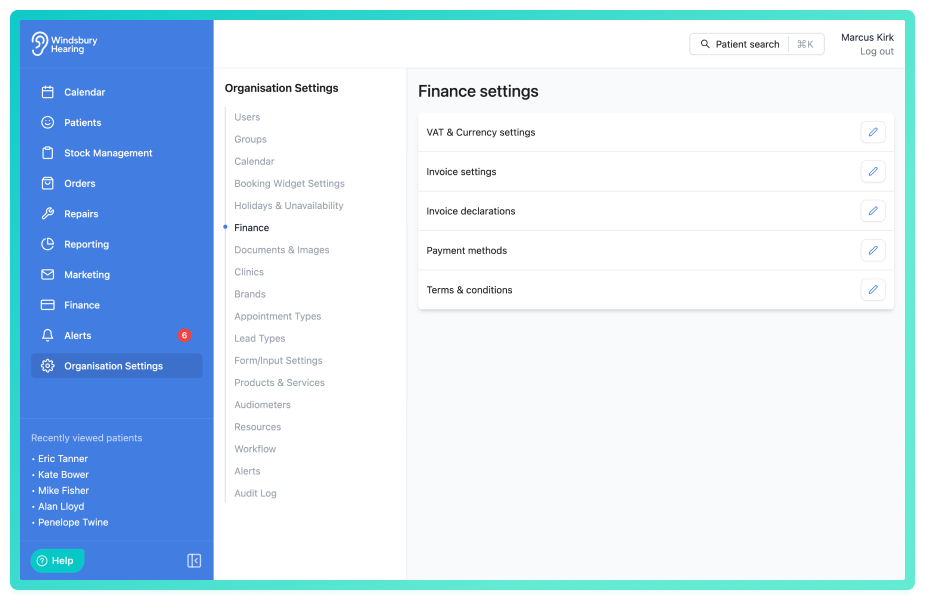
Here's what you can do under Finance settings:
- Edit VAT and Currency
Set your organisation’s default currency and VAT rate for consistency across orders and invoices. - Configure Invoice Settings
Set invoice prefixes and formats to match your internal accounting or local legal standards. - Add and manage Terms & Conditions
Add uploaded terms and conditions to appear on invoices. - Invoice/Order Declarations
Add custom declarations to appear on invoices. You can also edit or delete existing declarations at any time. Use dynamic variables in your declarations to automatically populate fields like patient name or invoice number. - Set accepted Payment Methods
Choose which payment types (e.g., cash, card, transfer) are available when processing payments through the system. - Integrate Xero
Integrate Xero into HearLink and export ready made CSV files to be imported into Xero.
Why it matters?
Finance settings ensure your documents are accurate, professional, and compliant. They also support smoother billing workflows for your staff and clearer communication for patients. Keeping this section up to date helps avoid errors and keeps your organisation aligned with financial best practices.
Was this article helpful?
That’s Great!
Thank you for your feedback
Sorry! We couldn't be helpful
Thank you for your feedback
Feedback sent
We appreciate your effort and will try to fix the article