The Invoice declarations section allows you to include optional declarations from both the audiologist and the patient. These declarations appear on the final invoice for sign-off, acknowledgement, or regulatory purposes.
In this article we'll cover how to:
- enable or disable declarations.
- understand how declarations are displayed.
For a general overview, read Create an invoice.Invoice declarations
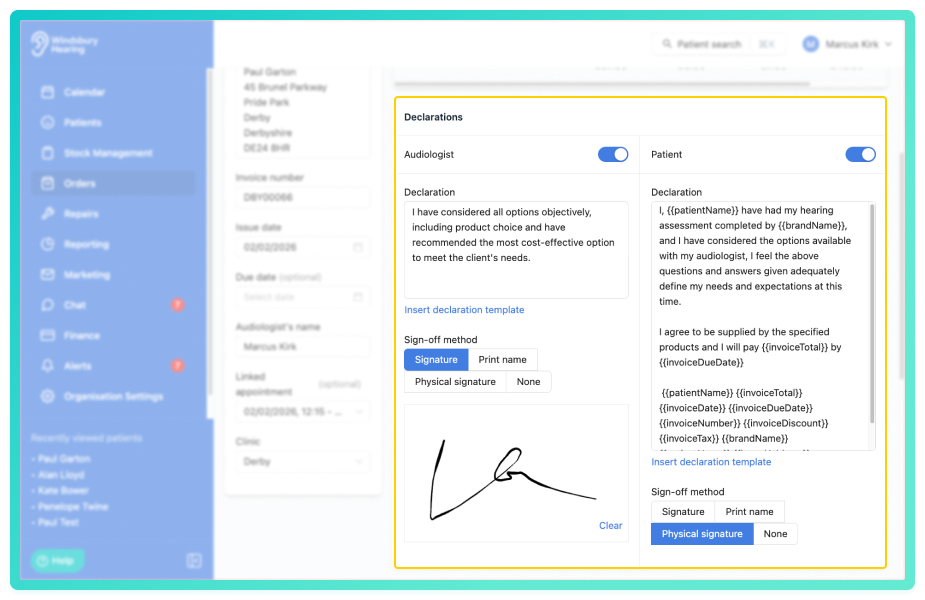
You can choose to include a declaration for either the audiologist, the patient, or both:
- For each declaration, select Enabled or Disabled based on your requirements.
- If enabled the Sign-off method will need to be selected. A physical signature will create a signature box on the PDF with the patient or audiologist's name printed below.
Example: If both declarations are needed for compliance or confirmation, enable both options before submitting the invoice.
Declaration variables
You may have noticed placeholders such as {{patient_name}} or {{invoice_date}} within the declaration text. These are declaration variables used to automatically populate information.
To learn more, see Declaration variables.Was this article helpful?
That’s Great!
Thank you for your feedback
Sorry! We couldn't be helpful
Thank you for your feedback
Feedback sent
We appreciate your effort and will try to fix the article