The appointment conversion rate report helps you understand how effectively appointments are turning into revenue. Use this report to view conversion performance, identify trends, and analyse the impact of referrals and other filters.
This report displays:
- total appointment opportunities.
- converted appointments and conversion rate.
- average order value.
- total revenue.
You can also group data and apply filters to refine your analysis.
View the conversion rates report
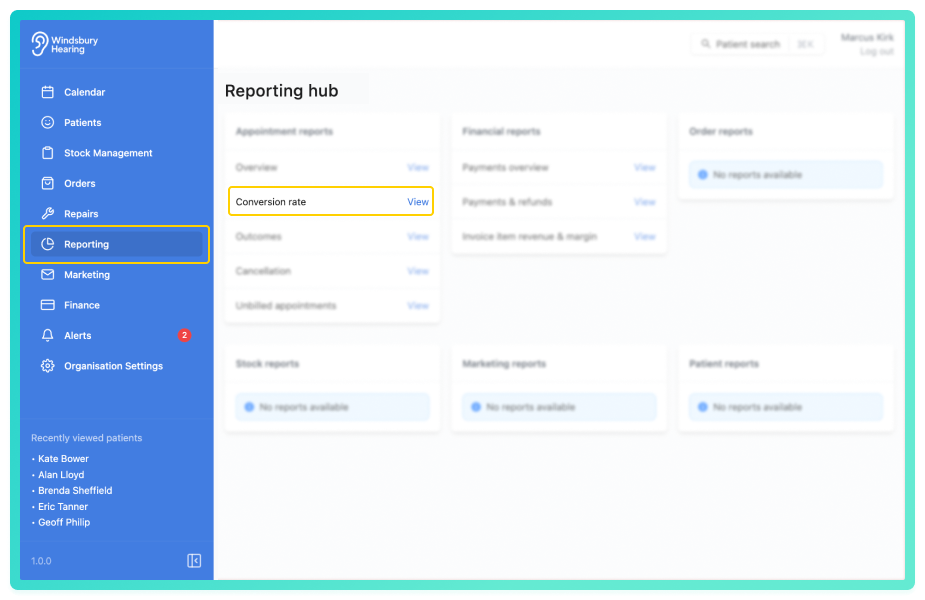
By default, the report shows a single total row of data across the selected date range
This includes:
- Opportunities - total eligible opportunities.
- Converted - number and percentage of converted appointments.
- Average order value - average revenue per conversion.
- Revenue - total revenue from converted appointments.
You'll also see a bar chart visualising the conversion activity across the selected period.
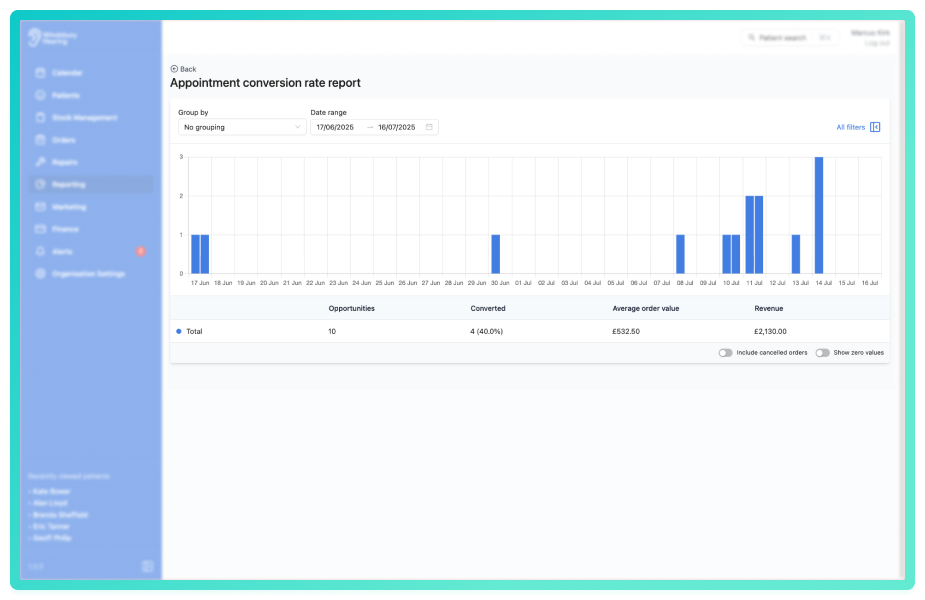
Use the Group by dropdown to segment the data.
Click All filters to open the sidebar and apply filters to narrow the results.
You can save a set of filters for each report to quickly change the data on the report. See Saved report filters
This report is ideal for tracking how well appointments are converting into revenue and identifying what factors may influence those results.
Was this article helpful?
That’s Great!
Thank you for your feedback
Sorry! We couldn't be helpful
Thank you for your feedback
Feedback sent
We appreciate your effort and will try to fix the article