The Workflow in HearLink helps your organisation manage patient progress from their first interaction through to final outcomes. It defines the various statuses a patient can be in and how they move between those statuses. HearLink also provides a secondary workflow that's linked to the primary for managing more complex patient journeys and processes. This ensures that staff follow a consistent process while also offering the flexibility to match your clinic's specific needs.
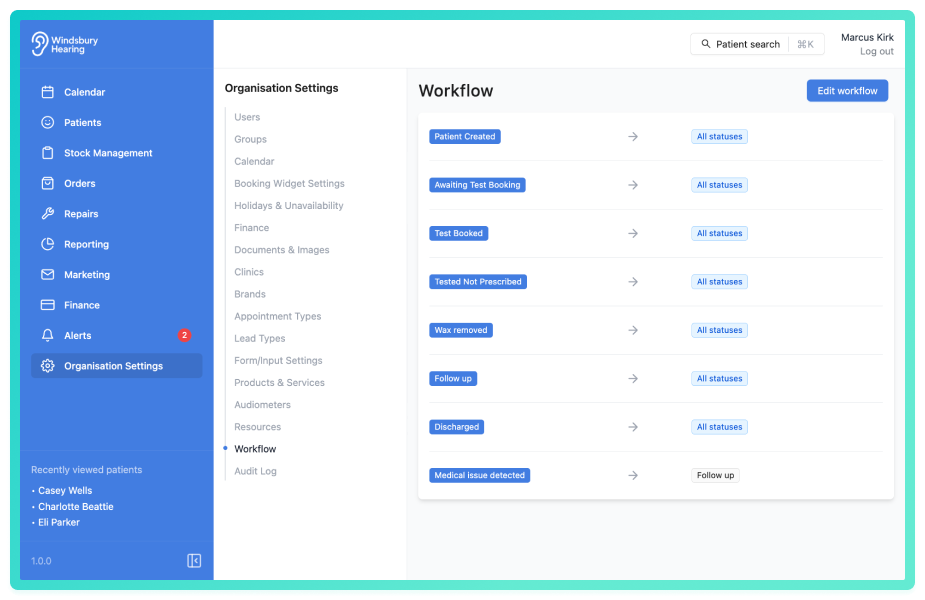
In this article we'll cover:
- What a workflow is.
- What a status is.
- How statuses can transition.
- An overview of the secondary workflow.
- Who can manage workflows.
What is a workflow?
A workflow is the structured set of statuses a patient can move through. It appears throughout the system, particularly when you're managing patients, and helps your team understand where each patient is in their journey.
The order of statuses is fully customisable, allowing each organisation to define what their process looks like (e.g. New enquiry → First appointment → Fitted → Follow-up → Completed).
| Workflow Name | Statuses | Used For |
|---|---|---|
| Patient Created | → All statuses | Creating a new patient |
| New Booking | → Booked → Seen → Completed | General Appointments |
| Repairs | → Received → In Progress → Fixed | Equipment servicing appointments |
What is a status?
A status represents a stage in the patient journey. Each status is displayed in the dropdown menu when updating a patient’s status and is part of the organisation’s custom workflow.
Statuses can be:
- Created to reflect a new stage in your process
- Edited to update the name or wording
- Reordered to match the preferred patient journey
- Deleted if no longer needed
You can also define which statuses are allowed to transition to others, offering greater control over movement through the workflow.
What is a secondary workflow?
A secondary workflow works alongside your primary workflow, providing a structured set of statuses for specific side processes that can occur during a patient journey.
Examples include:
- A hearing aid trial process running alongside the main treatment workflow.
- A booking workflow process attached to the main booking workflow.
| Workflow Type | Name | Statuses |
|---|---|---|
| Primary | Hearing care journey | New → Fitted → Follow-up → Complete |
| Secondary | Repair process | Received → In progress → Returned |
| Secondary | Trial workflow | Trial start → Review → Trial end |
You can read more about secondary workflows here.
What are status transitions?
Status transitions control how a patient can move from one status to another. By default, statuses can only move to others you allow.
There are two transition types:
- All statuses - allows a status to move to any other status in the system
- Specific statuses - restricts movement to one or more selected statuses only
This gives you control over how strictly the workflow is followed and avoids skipping critical stages
Was this article helpful?
That’s Great!
Thank you for your feedback
Sorry! We couldn't be helpful
Thank you for your feedback
Feedback sent
We appreciate your effort and will try to fix the article