Conversion Opportunity Criteria define which appointments count as a "qualified opportunity" for the Conversion Rate metric on your performance dashboards. You can configure one or more criteria sets to narrow the rate to a meaningful audience, for example, only adults with measurable hearing loss, or only returning patients due for an upgrade, or both at once.
Scope: These criteria only affect the Conversion Rate widget on performance dashboards. Other HearLink reports are not influenced by this setting.Only Organisation Owners and users with permission to manage dashboard settings can configure conversion opportunity criteria. If you should have access and don't, contact your organisation owner.In this article we'll cover:
- what conversion opportunity criteria do.
- where to find the settings.
- setting up a criteria set, field by field.
- combining multiple criteria sets.
- how the criteria affect the Conversion Rate metric.
- a few worked examples.
What conversion opportunity criteria do
The Conversion Rate metric on a performance dashboard is calculated as:
- (qualifying appointments that resulted in an order or invoice) ÷ (all qualifying appointments) × 100
"Qualifying" is what the criteria define. By adding criteria you narrow the pool to a specific audience, for example, only adults, only patients with a recorded hearing loss above a certain threshold, or only returning patients with old devices.
If no sets are configured, the rate falls back to counting every appointment whose appointment type has the Sales Opportunity setting turned on. Set this on an appointment type from Organisation Settings → Appointment Types.How sets combine: within a single set, every populated field must match (AND). When you have more than one set, an appointment qualifies if it matches any one of the sets (OR). An appointment that matches multiple sets is still only counted once.Find the settings
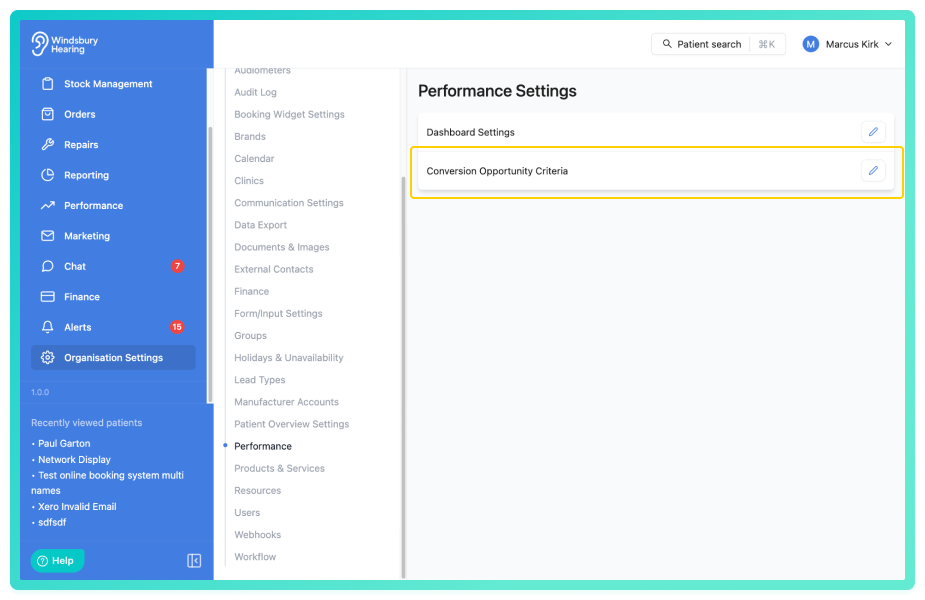
- Navigate to Organisation Settings.
- Locate and click Performance.
- Click the Edit
 icon Conversion Opportunity Criteria.
Setting up a criteria set
The Conversion Opportunity Criteria page lists your current criteria sets in a table with Name, Created, and Last updated columns. From here you can:
- Click Add criteria to open a dialog and configure a new set.
- Click a row's edit action to change an existing set.
- Click a row's delete action to remove a set. You'll be asked to confirm before it's deleted.
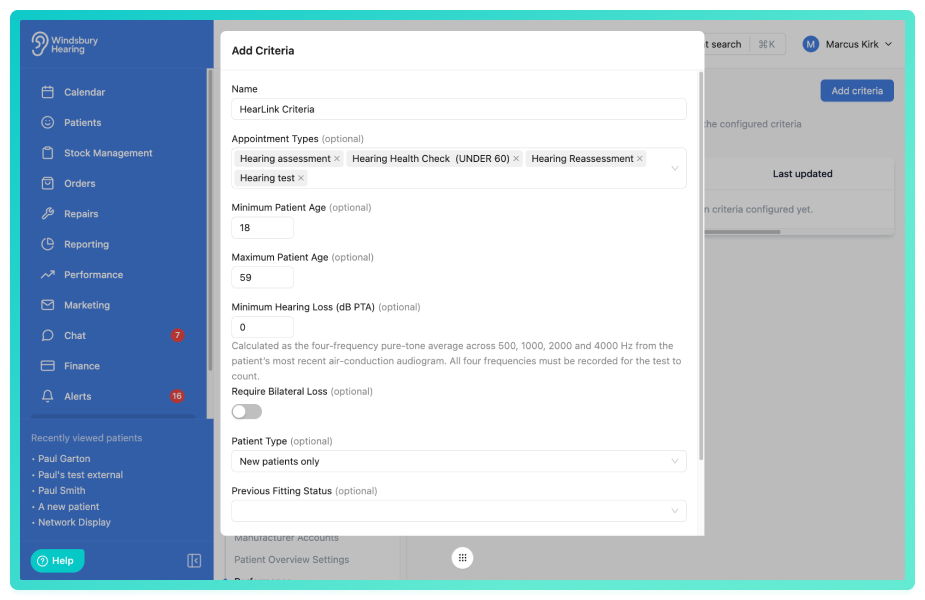
Inside the Add Criteria / Edit Criteria dialog, every field except Name is optional. Leave a field empty to ignore that criterion.
- Name: a label for this set so you can recognise it in the list, for example "Aged 60+ with bilateral loss" or "Returning patients due for upgrade". Required.
- Appointment Types: only count appointments whose type is one of those selected. Leave empty to include every appointment type that's marked as a sales opportunity.
- Minimum Patient Age / Maximum Patient Age: restrict to patients within an age range, calculated from their date of birth.
- Minimum Hearing Loss (dB PTA): only include patients whose recorded hearing loss meets this threshold. The value is the four-frequency pure-tone average (500, 1000, 2000 and 4000 Hz) from the patient's most recent air-conduction audiogram. All four frequencies must be present for the audiogram to count.
- Require Bilateral Loss: when on, the threshold above is applied to the patient's better ear (so both ears meet the threshold). When off, the threshold is applied to the worse ear only.
- Patient Type: restrict to New patients only (this appointment is the patient's first non-cancelled appointment with your organisation), Returning patients only (the patient has had earlier appointments), or Any.
- Previous Fitting Status: restrict to patients with No previous fitting, Has previous fitting, or Any. A patient is considered to have a previous fitting if a hearing aid in stock has been allocated to them at any point.
- Minimum Device Age (years): only shown when Previous Fitting Status is set to Has previous fitting. Restricts to patients whose most recent fitting is at least this many years old, useful for surfacing upgrade opportunities.
- Referral Sources: only count appointments whose patient came from one of the selected referral sources (lead types).
Click Submit on the dialog to save the set. Sets take effect immediately on every dashboard.
Combining multiple criteria sets
Use more than one set when you want the Conversion Rate to cover several distinct audiences that don't share a single profile. Each set is evaluated independently, and an appointment qualifies if it matches any of them.
- A returning-patient upgrade set OR an older-bilateral-loss set, for example, captures both groups in the same Conversion Rate without having to merge them into one set of filters that neither group fully satisfies.
- An appointment that matches more than one set is only counted once, on either side of the calculation, so overlapping sets won't inflate the rate.
Tip: If you find yourself trying to express "this group OR that group" inside a single set, that's the cue to split it into two sets instead.Situations where a patient can be excluded
Each criterion needs the relevant data on the patient or appointment. If that data is missing, the patient is silently excluded from the calculation rather than flagged as a failure to convert.
- Minimum / Maximum Patient Age: patients with no date of birth recorded are excluded.
- Minimum Hearing Loss: requires a complete air-conduction audiogram with values recorded at 500, 1000, 2000 and 4000 Hz. Patients with no audiogram, or whose most recent audiogram is missing any of those four frequencies, are excluded.
- Require Bilateral Loss: both ears must have been tested. Patients with only one ear tested are excluded.
- Patient Type - Returning patients only: patients with only one non-cancelled appointment in HearLink aren't counted as "returning" and are excluded. The same patient would be counted under "New patients only".
- Previous Fitting Status - Has previous fitting: only patients who have had a hearing aid from your stock allocated to them in HearLink are counted. Patients fitted outside HearLink, or where the stock wasn't recorded, are excluded.
- Minimum Device Age: only patients whose most recent allocated hearing aid has a recorded allocation date are counted. Patients with no fitting, or with a fitting that has no recorded date, are excluded.
- Referral Sources: patients with no referral source set are excluded.
Note: Excluded patients are removed from both sides of the calculation, they don't lower your conversion rate, they're simply not counted at all. The tighter your criteria, the more important it is that the data they depend on is being recorded consistently. Otherwise the rate may look healthy because the patients who would have lowered it were excluded due to missing data.How criteria affect the Conversion Rate metric
The criteria are applied to both sides of the calculation. Appointments that don't match any set are removed from both the count of qualified opportunities and the count of those that converted, not just one side.
Adding more criteria typically narrows the pool, which can move the rate up or down depending on which appointments are removed. Adding more sets, or removing criteria from a set, widens the pool again. There's no historical record of past criteria settings, the rate is always recalculated using whatever sets are currently saved.
Note: Changing the criteria changes how every Conversion Rate widget on every dashboard is calculated, both for the current period and the comparison period. Discuss changes with your team before saving so everyone reads the same numbers the same way.Worked examples
Example 1 - Adults with measurable hearing loss
- Name: Adults with hearing loss
- Minimum Patient Age: 18
- Minimum Hearing Loss: 25 dB PTA
Only counts appointments where the patient is at least 18 and has a recorded hearing loss of 25 dB PTA or more in their worse ear. Children, paediatric patients, and adults with normal hearing are excluded.
Example 2 - Returning patients due for an upgrade
- Name: Returning, due for upgrade
- Patient Type: Returning patients only
- Previous Fitting Status: Has previous fitting
- Minimum Device Age: 5 years
Only counts appointments with returning patients who already have a fitting that's at least five years old. The Conversion Rate becomes a measure of how well you're upgrading your existing patient base.
Example 3 - Specific appointment types from specific referral sources
- Name: NHS & online new lead funnel
- Appointment Types: Hearing Test, Initial Consultation
- Referral Sources: NHS Referral, Online Booking
Only counts hearing tests and initial consultations where the patient came from an NHS referral or an online booking. Useful for measuring the conversion of leads from particular acquisition channels through specific entry-point appointments.
Example 4 - Two sets combined with OR
Saving both Example 1 (Adults with hearing loss) and Example 2 (Returning, due for upgrade) at the same time means an appointment qualifies if it matches either profile. The Conversion Rate then reflects performance across both your new-adult opportunities and your existing patients due for an upgrade, in a single number, without each set having to dilute its own filters to accommodate the other.
If your dashboards already show Conversion Rate widgets, the rate will refresh as soon as you save changes here. Open a dashboard alongside this settings page to see the effect.
Was this article helpful?
That’s Great!
Thank you for your feedback
Sorry! We couldn't be helpful
Thank you for your feedback
Feedback sent
We appreciate your effort and will try to fix the article