When adding or editing a patient in HearLink, your organisation can customise which fields are shown in the form. This helps ensure you're collecting only the information relevant to your workflow.
Most fields can be enabled or disabled in your organisation settings depending on your requirements. However, State, Referral, Full name, and Primary phone number are always required and cannot be disabled.In this article we'll cover:
- what each patient form field means.
- which fields can be configured.
Patient form fields explained
State
Active, Inactive or Deceased. Determines the patient's current status within the organisation.
Referral/Lead Type
Describes how the patient came to your organisation (e.g. GP, marketing campaign).
Referral/Lead sub type
Further specifies the referral (e.g. which GP or campaign).
Title
The patient's preferred title (e.g. Mr, Mrs, Dr).
Full name
Patient's first and last name.
Address
Postal address of the patient.
Primary phone number
Main contact number. This is required.
Secondary phone number
Optional additional number for contact.
Email address
Patient's email for communication.
Date of birth
Used for identification and patient record accuracy.
Gender
Optional gender information.
Primary clinic
The clinic location primarily associated with the patient.
Conditions
Any relevant hearing or medical conditions.
You can add as many conditions as required. Enable Conditions and click the Edit condition options to add conditions.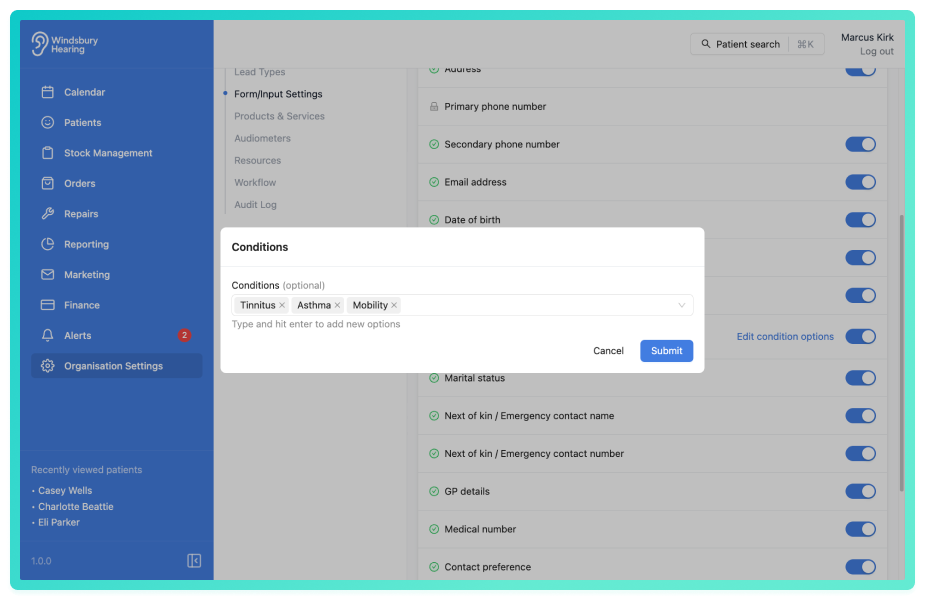
Marital status
Optional personal detail.
Next of kin / Emergency contact name
Who to contact in an emergency.
Next of kin / Emergency contact number
Contact number for the next of kin.
GP details
The patient's general practitioner information.
Medical number
An internal or external medical ID (if applicable).
Contact preferences
How the patient prefers to be contacted (e.g. phone, email, post).
Contact permissions
Stores consent for different types of communication.
Custom field
Any additional field your organisation has added.
Was this article helpful?
That’s Great!
Thank you for your feedback
Sorry! We couldn't be helpful
Thank you for your feedback
Feedback sent
We appreciate your effort and will try to fix the article