Your organisation can configure various input settings across the HearLink system, including patient forms, order forms, custom forms, and reusable note snippets. These settings help tailor workflows to your organisation’s needs and improve efficiency when entering data.
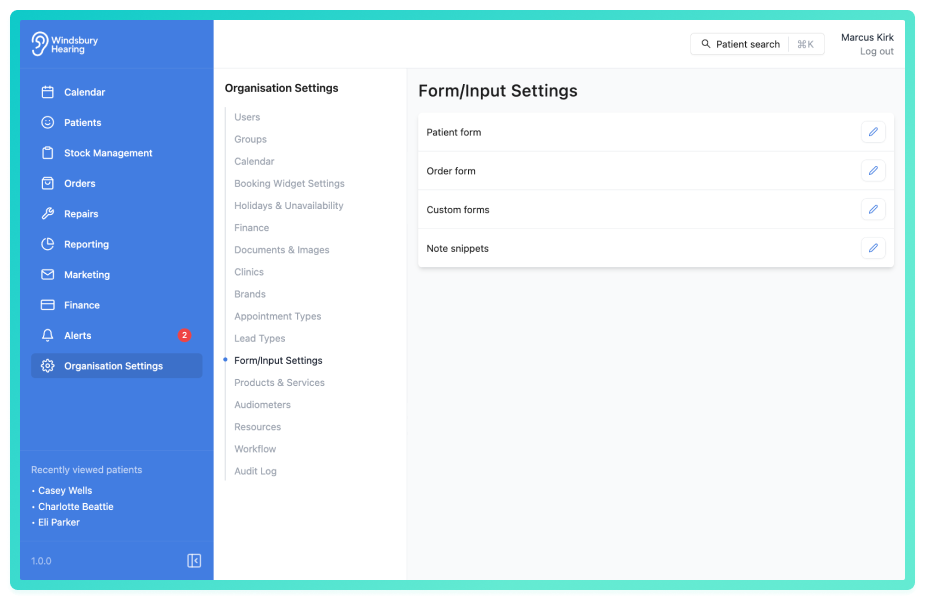
In this article we’ll cover how to:
- customise the patient form.
- configure the legacy order form.
- create, edit or delete custom forms.
- manage note snippets.
Customise the patient form
- Enable or disable predefined patient form fields.
- Add custom fields to collect additional information.
- Edit or delete custom fields as needed.
Learn more in Edit the patient form.
Configure the legacy order from
Enable or disable order fields for the classic ordering system.
Note: This form is only used for the legacy ordering method. Learn more in edit order form (deprecated).Create and manage custom forms
- Create reusable patient-facing forms.
- Add and arrange form components.
- Mark components as mandatory or optional.
- Preview and publish your forms.
- Edit or delete existing custom forms.
Learn more in add a custom form and edit or delete a custom form.
Use and manage note snippets
- Create reusable text snippets with custom triggers.
- Use snippets in any text area with the
/triggershortcut. - Edit or delete snippets anytime.
Learn more in add a note snippet, edit or delete a note snippet, and how note snippets work.
Was this article helpful?
That’s Great!
Thank you for your feedback
Sorry! We couldn't be helpful
Thank you for your feedback
Feedback sent
We appreciate your effort and will try to fix the article