As well as scribing consultations, Tonee can produce a short, plain-English summary of a hearing test. The AI summary appears automatically beneath the audiogram on each hearing test card, interpreting what the results mean — so both clinicians and non-clinical staff, such as receptionists, can understand the picture at a glance without reading the chart.
AI summaries are generated drafts and must be verified against the audiogram before use.
In this article we'll cover:
Audiogram AI summaries are part of Tonee Scribing. Viewing them requires permission to read the patient's hearing tests.Where to find the AI summary
- Open the patient's Hearing tests tab.
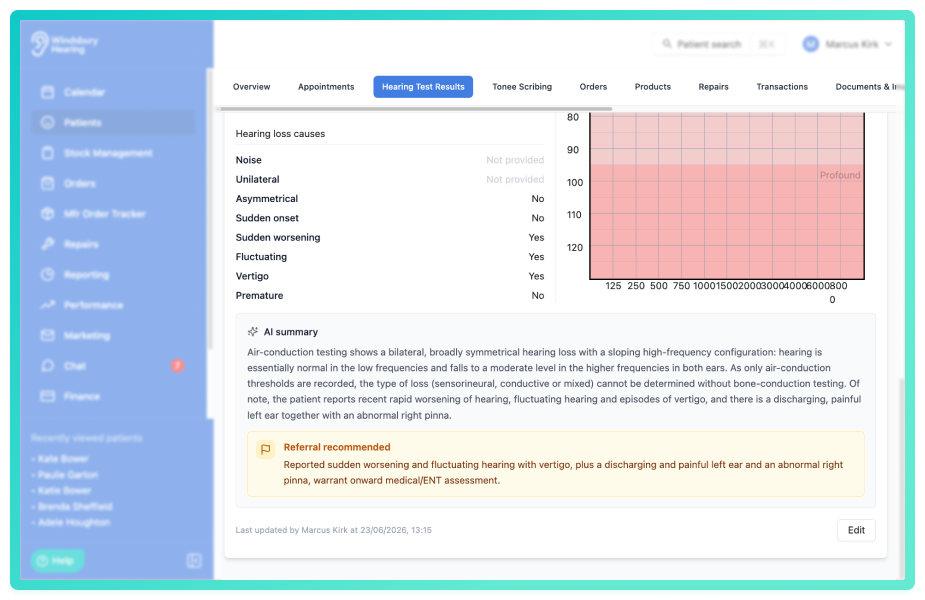
- Find the hearing test card. The summary appears below the audiogram, under the AI summary heading.
What the summary tells you
The summary is a few sentences of plain prose that interpret the test — what the results mean, rather than what they look like on the graph. It typically covers:
- the degree of hearing loss (for example mild, moderate, severe or profound);
- the configuration (for example high-frequency, low-frequency or flat);
- whether the loss is symmetrical or asymmetrical, naming the affected ear or ears;
- the type of loss (sensorineural, conductive or mixed) — but only where bone-conduction thresholds support it;
- any relevant ear-health observation or reported characteristic recorded against the test.
A few things it deliberately does not do:
- It does not list individual dB or Hz threshold values or describe the plotted points, the audiogram chart already shows those.
- It won't state the type of loss when only air-conduction thresholds are available; instead it reports the results and notes that the type can't be determined without bone-conduction testing.
- It only states what the recorded data supports, it won't infer or add detail that isn't there.
Occasionally the summary ends with a short test-quality note, for example, where masking appears to have been indicated but not carried out. This only appears when the data clearly suggests a concern, and is there to draw the clinician's attention to it.
Referral recommended
When the recorded findings suggest the patient may need to be referred on, an amber Referral recommended box is shown beneath the summary, with a brief reason where available. Tonee raises it for the kinds of findings that usually warrant onward referral, such as:
- Asymmetry between the ears — a notable difference in thresholds between the two ears.
- Sudden or rapidly progressive loss — hearing that has dropped quickly or appears to be worsening fast.
- Unilateral loss — loss affecting only one ear.
- Persistent unilateral tinnitus — ongoing tinnitus in one ear only.
- Vertigo — reported dizziness or a balance disturbance.
- Conductive signs — an air–bone gap or other indication of a conductive component.
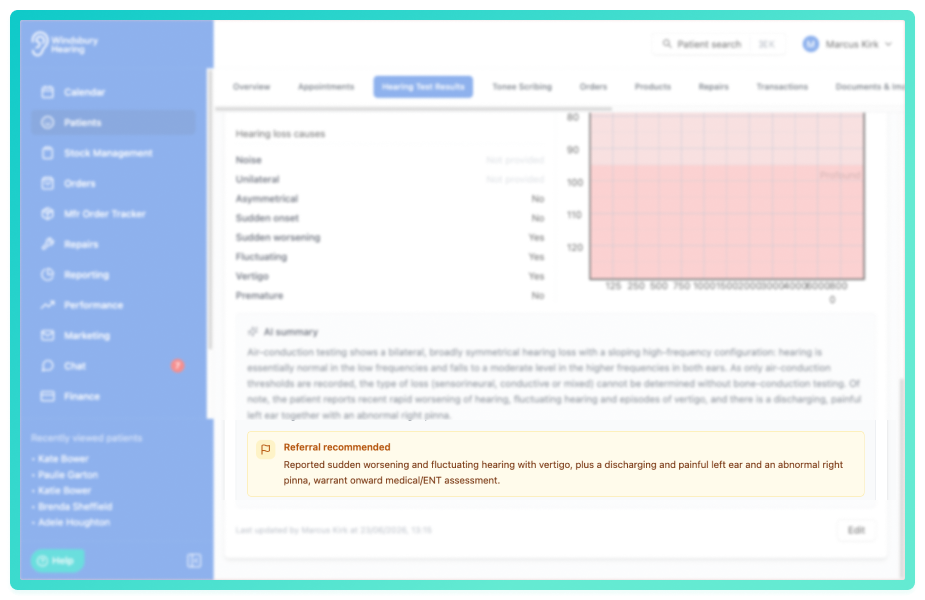
The flag is based only on the recorded thresholds and the details captured against the test. It's a prompt for your clinical judgement, not a decision — not every flagged result will need a referral, and you should weigh it against the full clinical picture.
Reminder: the AI summary is a generated draft to support, not replace, your own reading of the audiogram. Always check it against the results before relying on it or sharing it.When the summary is generated and updated
- A summary is generated automatically when a hearing test is created, you don't need to request it.
- It regenerates whenever the test's clinical details change — the thresholds, ear-health observations, hearing-loss characteristics, duration of loss, or family history. Editing other details (such as the test date) won't trigger a new summary.
- While it's working you'll see Generating summary… the summary replaces this once it's ready.
A test with no threshold data won't have an AI summary, and older hearing tests recorded before audiogram AI summaries were available won't show one. Adding or updating the thresholds on a test will generate one.Was this article helpful?
That’s Great!
Thank you for your feedback
Sorry! We couldn't be helpful
Thank you for your feedback
Feedback sent
We appreciate your effort and will try to fix the article