Appointment types help you define, customise, and manage the different kinds of appointments offered within your organisation. Each type can have its own name, colour, duration, and configuration options to support your workflow and patient experience.

In this overview we’ll cover:
- what appointment types are.
- how they are used in the system.
- key features and customisation options.
- how to filter appointment types for easy look up.
What are appointment types
An appointment type represents a specific kind of service. Example, Hearing Test, Wax Removal, or Initial Consultation. Each type includes settings that help tailor how the appointment behaves in the calendar, booking widget, and communications.
| Type Name | Duration | Requires Resource | Sale Opportunity |
|---|---|---|---|
| Consultation | 60 mins | Yes (Clinic Room) | Yes |
| Follow up | 30 mins | No | No |
| Domiciliary | 90 mins | Yes (Vehicle) | Yes |
Key features
Custom names and colours
Helps distinguish appointment types visually in the calendar and for patients during booking.Duration settings
Set the length of each appointment in minutes. This directly affects calendar slot availability.Assignable users
Limit which practitioners or staff can be booked for specific appointment types.Required resources
Ensure necessary rooms or equipment are available when the appointment is scheduled.Reminders and confirmations
Send patients SMS or email messages to confirm or remind them of upcoming appointments.Online booking widget visibility
Choose which appointment types are made available for online booking and customise the display content.Disabled Days
Appointment types can be disabled for specific days.
Appointment types are fully managed through Organisation settings, and can be added, edited, or deleted at any time. Each setting helps ensure that your appointments are booked accurately and efficiently.
Filtering appointment types
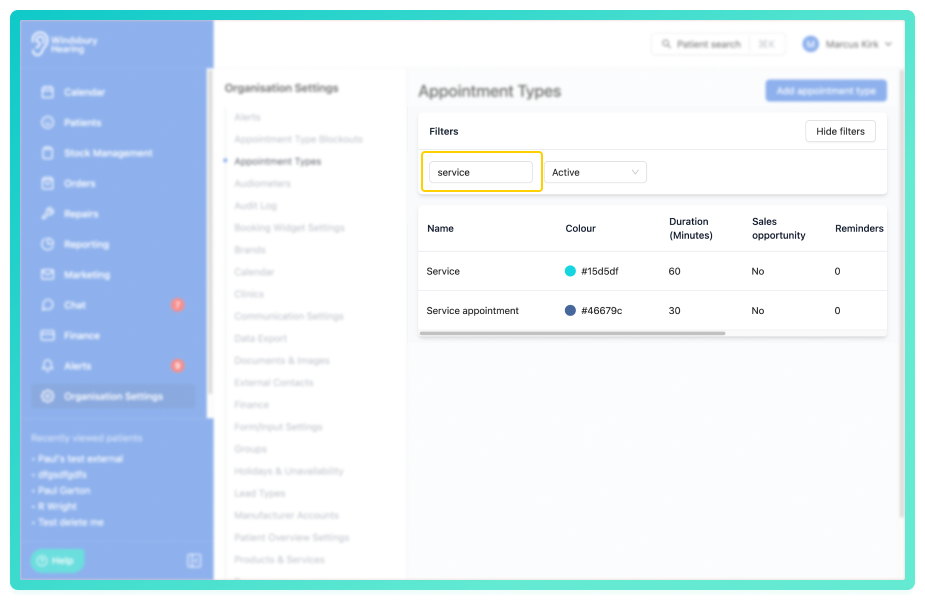
Appointment types are able to be filtered by name and appointment types that are archived (deleted).
Example:
- A user wants to find all appointment types with the word service in.
- Type service into the search parameter and a list of appointment types with the word service in will be displayed.
Was this article helpful?
That’s Great!
Thank you for your feedback
Sorry! We couldn't be helpful
Thank you for your feedback
Feedback sent
We appreciate your effort and will try to fix the article