In this article we'll cover the different repair statuses in more detail.
Understanding repair statuses
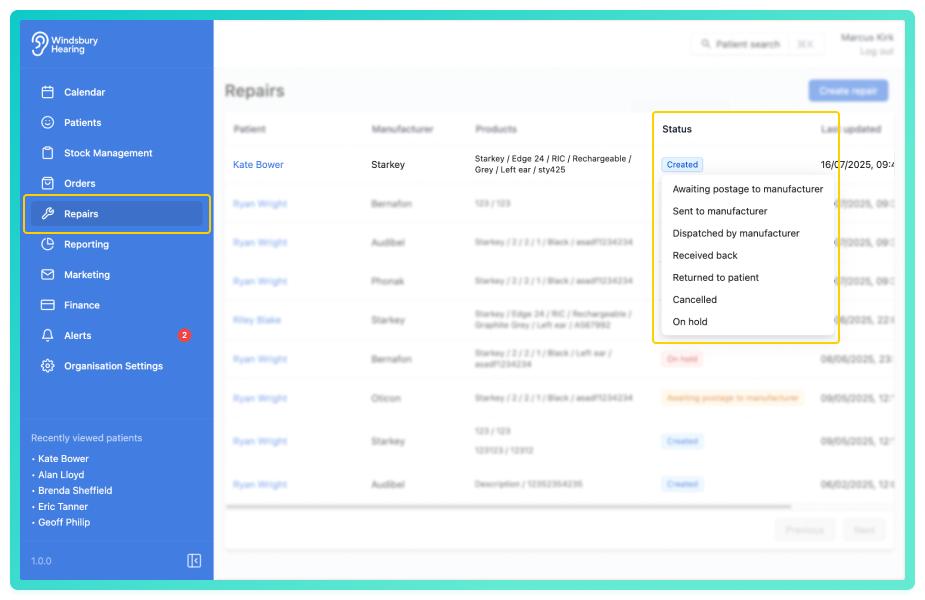
- Click the current Status to view a list of available statuses.
Statuses explained
Awaiting postage to manufacturer
Use this status when the product being repaired is awaiting postage.
Sent to manufacturer
Use this status when the product being repaired has been posted.
Dispatched by manufacturer
Use this status when the product has been repaired and posted back to the organisation.
Received back
Use this status when the repaired product has been received by the organisation.
Returned to patient
Use this status when the repaired product has been returned to the patient. This removes the repaired product from the repairs list but it will remain visible in the Patient's dashboard.
Cancelled
Use this status when a repair has been cancelled. This removes the repair from the repairs list but it will remain visible in the Patient's dashboard.
On hold
Use this status when a repair is on hold.
Was this article helpful?
That’s Great!
Thank you for your feedback
Sorry! We couldn't be helpful
Thank you for your feedback
Feedback sent
We appreciate your effort and will try to fix the article