Lead types allow your organisation to track where patient referrals are coming from — helping to measure marketing effectiveness, referral performance, and other reporting insights.
A lead type is an optional field that can be selected when creating a new appointment. Each lead type can also include sub-types for more detailed categorisation.
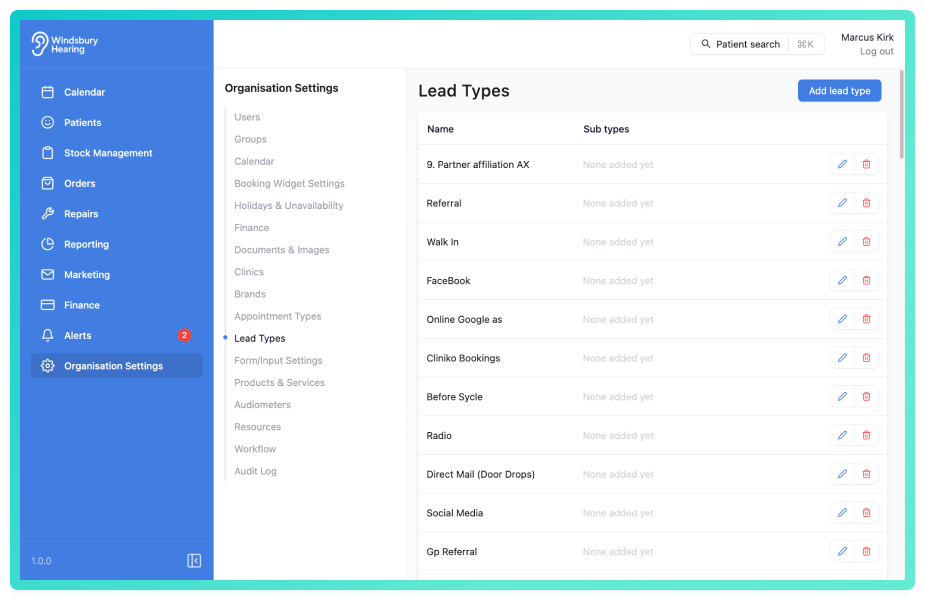
In this article we’ll cover:
- what lead types are.
- how sub-types work.
- where lead types are used in HearLink.
What are lead types?
Lead types represent the original source of a patient’s referral. For example:
- GP Referral
- Walk-in
- Online Campaign
- Word of Mouth
When creating an appointment, a lead type can be selected to help track how the patient found your clinic.
What are sub types?
Each lead type can be broken down further into sub-types for more granular reporting.
Example:
If “GP Referral” is the lead type, you could add sub-types like:
- Local GP Clinic
- Specialist Referral
- Returning Patient Recommendation
| Lead Type | Example Sub-types |
|---|---|
| GP Referral | Local GP, Consultant |
| Online | Google Ads, Facebook, Website Form |
| Walk in | No appointment, self presented |
| Internal | Another clinic/department |
| Word of Mouth | Friend, Family |
These sub-types can then be selected when booking an appointment.
Where are lead types used?
Lead types appear in the following areas of HearLink.
- Appointment creation: as an optional field.
- Adding a new patient: tracking the source when patient was created.
- Reporting: used to generate referral performance reports.
Properly assigning lead types ensures accurate data for marketing and referral analysis.
Was this article helpful?
That’s Great!
Thank you for your feedback
Sorry! We couldn't be helpful
Thank you for your feedback
Feedback sent
We appreciate your effort and will try to fix the article